
Sphero Indi Is a Tiny Robotic Car That Helps Children Learn Programming

Google Adds Live Caption Flag in Latest Crome Canary


Google Adds Live Caption Flag in Latest Crome Canary

By Techtonic group

Google has come one step closer to adding the Live Caption feature to its web browser, Google Chrome. A few months back, a commit hinting at the existence of the feature was spotted on Chromium Gerrit and now, the flag to enable the feature is available in the latest build of Chrome Canary.

For those unaware, Live Caption was added to Android 10 devices, starting with the Pixel lineup last year. Over the following months, other Android 10 phones from OEMs like Samsung and OnePlus also started receiving support for the feature.

Before proceeding to enable the feature, do keep in mind that the feature is not functional yet and it simply brings up Live Caption's user interface to the browser, at least on Chrome Canary version 84.0.4136.1 I tested on. That said, we could expect it to be functional in the upcoming Canary builds. Anyway, if you are interested in taking a look for yourself, here is how to enable Live Captions in Chrome.

  • Visit the Chrome flags page (chrome://flags) and search for "Live Captions".
  • Enable the flag and restart the browser. Usually, features get enabled when you do this but enabling Live Caption involves another step in Chrome's accessibility settings.
  • Go to Settings -> Accessibility -> Live Caption (chrome://settings/accessibility) in your Chrome browser and enable the Live Caption toggle.
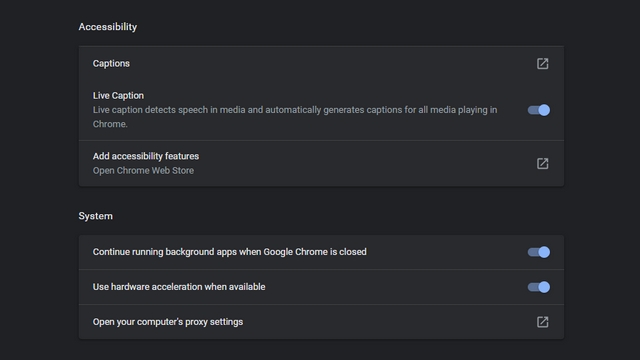
live caption toggle chrome canary

Once the toggle is enabled, you will see a floating translucent dismissable box, as you can see in the image below. The box can be moved around and repositioned anywhere you want in the browser. As I mentioned earlier, the feature doesn't seem to work and doesn't respond to media playing in the browser for now.
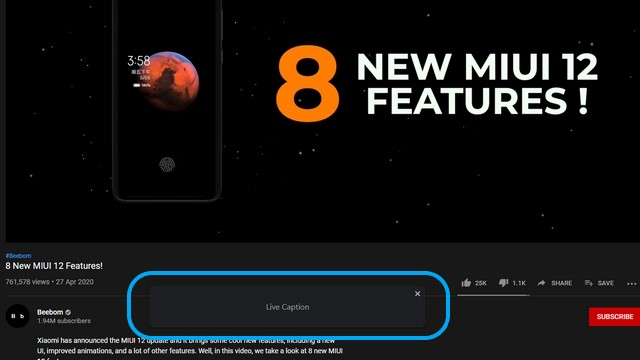
live caption ui

Now that the feature has appeared in Chrome Canary, we can safely assume that Live Caption would make its way to the stable builds sooner rather than later. Whenever Google adds it, it would help hearing-impaired people get a better experience on the web.

Comments

Popular posts from this blog

Here is the First-Ever Video That Was Posted on YouTube

Here is the First-Ever Video That Was Posted on YouTube By Techtonic group Fifteen years ago, on Valentines' Day of 2005, the domain name "www.youtube.com" went live. The following months saw developments of the website and the first-ever video on the platform was posted on April 23, 2005. The YouTuber who shared the video was none other than one of the founding members, Jawed Karim. The YouTube that we know now is a massive video streaming platform with innumerable audience members. However,  it is fascinating to see from where the platform started its journey . So, in this article, I want to talk about the very first video that was uploaded on the platform, and surprisingly, it still exists. So, the 240p, grainy video, titled "Me at the zoo", shows a 25-year-old Jawed Karim, one of the founders of YouTube, standing in front of a group of elephants at the San Diego Zoo.  The 18-second video went live on April 23, 2005, and it is still there with ove...

Instagram Parteners with Swiggy, Zomato to Let Resturant Add 'Food Order' Stickers in Stories

Instagram Parteners with Swiggy, Zomato to Let Resturant Add 'Food Order' Stickers in Stories By Techtonic group Instagram recently gave users the option to promote small (and local) businesses by placing a sticker in their Stories. Now, the company has partnered with two of India's renowned food delivery apps -  Swiggy and Zomato  - to bring a similar feature to the restaurant owners. It has debuted a new  'Food Order' sticker  that restaurants can include in their Stories to drive sales. The Coronavirus-led lockdown saw almost all restaurants and eateries shut shop for several days. And even when they opened, netizens have been wary to eat outside or order in due to hygiene concerns. Well, as restaurants open up in line with the WHO safety guidelines, they can now head to Instagram to find a new 'Food Orders' sticker in the Stories section. This new sticker is interactive and will  enable users to place food orders  simply by tapping on the sa...

Sphero Indi Is a Tiny Robotic Car That Helps Children Learn Programming

Robotic toys for learning are becoming more common in the market as kids turn more towards STEM learning. As a result, we’ve seen several modular and advanced robotic toys that are designed to help children learn the basic concepts of programming and problem-solving. And the Sphero indi is not that different. The Sphero indi Developed by renowned robotic-toy maker Sphero, the indi is essentially a toy car that helps children learn about the core concepts of problem-solving and logical thinking. The learning set comes with the indi, which the tiny robotic car, and a bunch of color-coded silicone-based tiles, designed to give the indi specific instructions. For instance, a green tile tells the car to move faster, a pink tile tells it to turn left, a yellow one instructs the car to drive slowly, and a red tile stops the car. So, the car comes equipped with a color sensor to detect the color of a tile over which it is driving and respond accordingly. Hence, using the Sph...