
Lenovo Legion Gaming Phone May Have Side-Mounted Popup Camera, 5,000mAh Battery
By Techtonic group
Lenovo is all set to launch its first Legion-branded gaming smartphone this year, and has been releasing a number of teasers to hype-up its upcoming device prior to its official announcement. Now, XDA claims to have stumbled upon a bunch of what it describes as "unreleased teaser videos" that seem to reveal some of the notable design elements and key tech specs of the first-generation Legion smartphone.
According to the report, one of the videos highlight the phone's 90W fast-charging credentials that can apparently juice-up the battery from 0-100 percent in just 30 minutes. What's also notable is that the company isn't sacrificing battery capacity either because a separate video revealed that the device will ship with a sizeable 5,000mAh dual-cell unit. However, in what might be disappointing to some would-be buyers, the phone will not have a 3.5mm audio jack.
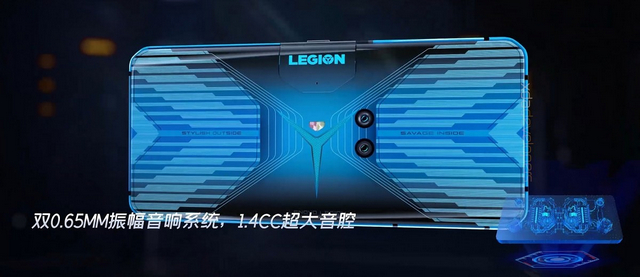
The report further suggests that the device will have a dual-camera setup (64MP+16MP wide-angle) at the back, but the really interesting part is the popup front-camera module (with a single 20MP sensor) that's located on the side of the phone. Most devices that implement the popup mechanism for selfie cameras have them at the top, so it will be interesting to see if the novel placement helps or hampers the functioning of the device.
The report also cites an insider source to reveal some of its key hardware specs, including UFS 3.0 internal storage and LPDDR5 RAM. It also suggests that the display will have an FHD+ resolution (2340×1080) and with a 270Hz touch sampling rate. On the software side of things, the phone will run Android 10 with 'LegionOS' on top. Lastly, the phone's model number is L79031 and its code-name is “moba”.
Lenovo last year announced plans to get into the niche mobile gaming segment with a Legion-branded gaming smartphone in 2020. In two separate teasers earlier this year, the company confirmed that the device will be powered by the Snapdragon 865 SoC and will support 90W fast-charging. Lenovo has since also confirmed that the first-generation Legion gaming phone will feature a notch-less display and will have a second USB Type-C port on the side so that users can charge the phone while holding it in landscape mode.
Featured Image Courtesy: XDA
According to the report, one of the videos highlight the phone's 90W fast-charging credentials that can apparently juice-up the battery from 0-100 percent in just 30 minutes. What's also notable is that the company isn't sacrificing battery capacity either because a separate video revealed that the device will ship with a sizeable 5,000mAh dual-cell unit. However, in what might be disappointing to some would-be buyers, the phone will not have a 3.5mm audio jack.
The report also cites an insider source to reveal some of its key hardware specs, including UFS 3.0 internal storage and LPDDR5 RAM. It also suggests that the display will have an FHD+ resolution (2340×1080) and with a 270Hz touch sampling rate. On the software side of things, the phone will run Android 10 with 'LegionOS' on top. Lastly, the phone's model number is L79031 and its code-name is “moba”.
Lenovo last year announced plans to get into the niche mobile gaming segment with a Legion-branded gaming smartphone in 2020. In two separate teasers earlier this year, the company confirmed that the device will be powered by the Snapdragon 865 SoC and will support 90W fast-charging. Lenovo has since also confirmed that the first-generation Legion gaming phone will feature a notch-less display and will have a second USB Type-C port on the side so that users can charge the phone while holding it in landscape mode.
Featured Image Courtesy: XDA
Comments
Post a Comment