
When MediaTek unveiled its newest mid-range 5G-enabled Dimensity 820 chipset a couple of weeks, Xiaomi was quick to jump aboard and reveal that Redmi 10X would be the first to be powered by this chipset. The company has been teasing new features of the Redmi 10X on social media for the past couple of weeks. And today, the Redmi 10X has officially been launched in China with an AMOLED display, quad-cameras, fast-charging, and more.
Redmi 10X Pro: Specs and Features
Instead of over-the-top gradient back panels like the Redmi K20 series, the company has decided to switch to minimal single color panels. Redmi 10X Pro features a huge rectangular camera cutout on the rear and AMOLED display with a waterdrop notch on the front. Since it's an AMOLED panel, you do get an in-display fingerprint sensor on board.
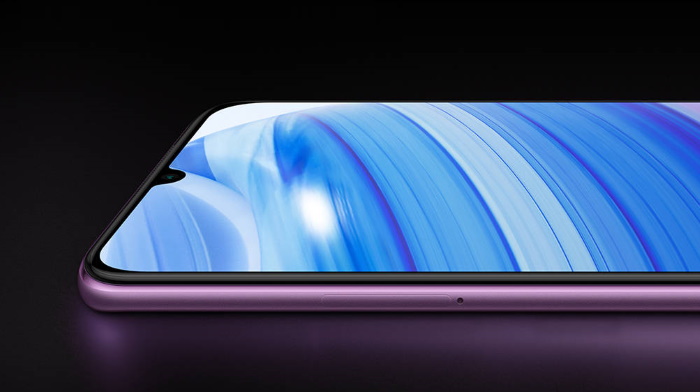
Redmi 10X Pro includes a 6.57-inch Full-HD+ AMOLED display with a 60Hz refresh rate and 180Hz touch response rate. The panel boasts a 20:9 aspect ratio, 2400 x 1800 resolution, HDR10+ support, and Gorilla Glass 5 protection on top. It seems like Xiaomi does not want to include high refresh rate panels into its phones to keep the prices low. But, I feel like they are dropping the ball on a major trend that makes for a great user experience.
As mentioned above, it's the MediaTek Dimensity 820 chipset that runs the show under the hood here. It comes integrated with 5G modem, making it possible for the device to support dual-mode 5G out-of-the-box. You also find up to 8GB of RAM and up to 256GB of storage onboard. Redmi 10X Pro is the first Xiaomi phone to run MIUI 12 based on Android 10 out-of-the-box.
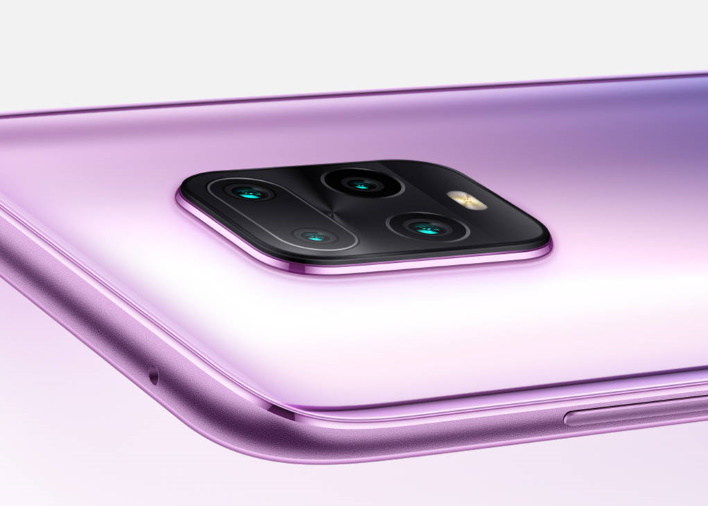
In the optics department, Redmi 10X Pro includes a quad-camera setup helmed by a 48MP sensor with OIS support. The primary sensor is coupled with an 8MP ultra-wide camera, an 8MP telephoto camera with 3x optical zoom and 5x hybrid zoom, and a 5MP macro camera. You can capture up to 30x zoom pictures using this setup. Let's not forget about the 20MP selfie snapper that's housed in the waterdrop notch on the front.
Redmi 10X Pro comes equipped with a 4,520mAh battery pack, along with 22.5W fast-charging support out-of-the-box. You will also find a USB Type-C port, a 3.5mm audio jack, IR blaster, and other major connectivity options in tow.
Redmi 10X: Specs and Features
Xiaomi also took the wraps off the standard Redmi 10X, which is mostly the same as its more exciting Pro sibling. The design and internals are exactly similar for both of these phones. It's only the camera setups that are slightly different.
Redmi 10X includes a triple camera setup. It includes a 48MP primary sensor, an 8MP ultra-wide camera, and a 5MP macro camera. The telephoto lens in the square quad-camera has been replaced with an LED flash. Also, you will find a 16MP selfie snapper aboard the Redmi 10X.
The battery and charging speeds remain the same as well. This is also one of the first phones to run MIUI 12 out-of-the-box.
Price and Availability
Redmi 10X has been priced at 1,599 yuan (around Rs. 16,999) for the 6GB+64GB base variant. There's a total of four configurations for the vanilla Redmi 10X, so we have listed the prices down below:
- 6GB+128GB - 1,799 yuan (around Rs. 19,099)
- 8GB+128GB - 2,099 yuan (around Rs. 22,299)
- 8GB+256GB - 2,399 yuan (around Rs. 25,499)
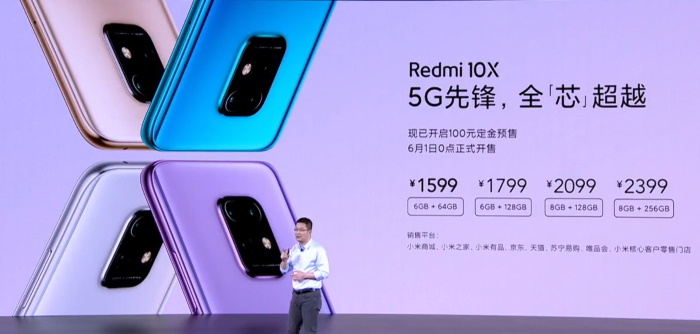
Redmi 10X Pro, on the other hand, will see Mi fans shell out 2,299 yuan (around Rs. 24,399) for the 8GB+128GB base variant and 2,599 yuan (around Rs. 27,599) for the 8GB+256GB variant. Both phones will be available in four color variants, namely Blue, Violet, Gold, and White.
Redmi 10X will go on sale from 1st June whereas the Pro variant will be available from 5th June in China. There is currently no word on whether these phones will come to India but the rumor mill suggests one of these could be rebranded as the Poco M2 Pro.
Comments
Post a Comment