Sphero Indi Is a Tiny Robotic Car That Helps Children Learn Programming

Twitter Now Lets You Limit Who Can Reply To Your Conversations

Twitter Now Lets You Limit Who Can Reply To Your Conversations
By tectonic group

Twitter has begun testing a new feature today and it enables users to choose who can participate in their conversations on the platform. If you open the Twitter app on your mobile, you will now be able to choose whether others can reply to your tweets or not.

The microblogging site first revealed that it's working on such a feature at CES 2020 earlier this year. Twitter aims to change the conversation dynamics with this feature, giving the users a chance to communicate in a way they prefer. This feature is similar to Facebook's post privacy settings, which lets you share a post with everyone, friends, group, or no one.
Testing, testing...

A new way to have a convo with exactly who you want. We’re starting with a small % globally, so keep your 👀 out to see it in action.
30.6K people are talking about this

Twitter Reply Controls: How It Works

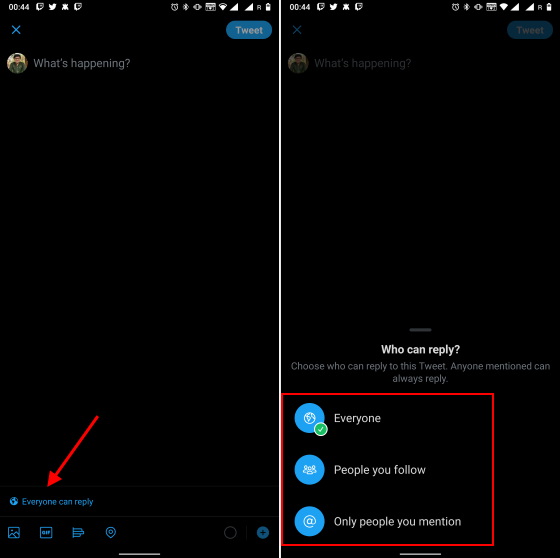
As seen in the screenshot below, you will now find a new 'globe' icon at the bottom of the compose window. Tapping the icon will open a pop-up window letting you choose 'Who can reply?' to your tweets. You will have three options to choose from - everyone, people you follow, and only people you mention.
The 'Everyone' option is obvious and makes Twitter work like always have. The other two options will limit the number of users who can interact with your tweet. The 'Only people you mention' option could be a great way to go back and forth on a topic. Twitter CEO Jack Dorsey could be looking to conduct an interview on Twitter using the latter.
tweet privacy controls
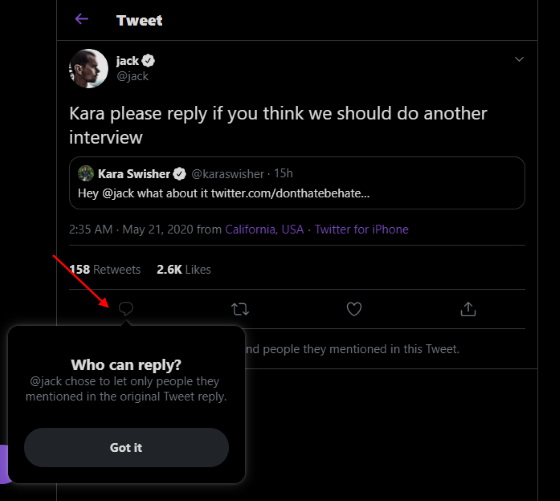
Everyone on the platform can view, like, and retweet your tweets, be in under any of the three conversation types. Users won't be able to reply if you don't follow them or if they aren't mentioned in a tweet. This condition applies in the latter two options. The reply icon will appear grayed out for all other users, as seen below:
reply button - twitter - grayed out
The reply controls are a test feature, thus, they are currently available only to a limited set of users. Twitter designed this feature to "give people more opportunities to weigh in while still giving people control over the conversations they start." We have only spotted the reply controls on the mobile app for now. It is missing in action on the web and desktop apps.

Comments

Popular posts from this blog

Here is the First-Ever Video That Was Posted on YouTube

Here is the First-Ever Video That Was Posted on YouTube By Techtonic group Fifteen years ago, on Valentines' Day of 2005, the domain name "www.youtube.com" went live. The following months saw developments of the website and the first-ever video on the platform was posted on April 23, 2005. The YouTuber who shared the video was none other than one of the founding members, Jawed Karim. The YouTube that we know now is a massive video streaming platform with innumerable audience members. However,  it is fascinating to see from where the platform started its journey . So, in this article, I want to talk about the very first video that was uploaded on the platform, and surprisingly, it still exists. So, the 240p, grainy video, titled "Me at the zoo", shows a 25-year-old Jawed Karim, one of the founders of YouTube, standing in front of a group of elephants at the San Diego Zoo.  The 18-second video went live on April 23, 2005, and it is still there with ove...

10 Best File Manager Apps for Android You Should Use

  Almost all Android smartphones   ship with a built-in File Manager app   today. However, not all OEM file managers offer the level of features and functionality that come with third-party apps on the Google Play Store. So today, we will tell you about the 10 best third-party file manager apps (often also referred to as file browser or file explorer) for Android. These apps will help you better organize your files and folders on an Android smartphone. Best File Manager Apps for Android (Updated May 2021) The best file manager apps on Android let you browse your files, find your downloads, manage your storage space, and more. There are plenty of file managers on Android, and most of them are free. While some of them offer you premium features for a small charge, others are ad-supported. So without any further delay, let’s check out the best file manager apps on Android. Table Of Contents  Note:  The apps mentioned in this article are meant for Android smartphone...

How to Remotely Access Your Raspberry Pi from Windows, Mac, Linux, & Chrome OS

  How to Remotely Access Your Raspberry Pi from Windows, Mac, Linux, & Chrome OS We have already written a detailed guide on  how to use a Windows laptop as a monitor for Raspberry Pi , and it requires a wired ethernet connection. However, if you want to remotely access Raspberry Pi from your Windows 10, Mac, or Linux PC, you can do so with Wi-Fi and VNC server. In this article, we also explain the steps to connect to your Raspberry Pi remotely from a Chromebook in detail. Even if you are a beginner, you can follow the instructions and get it running in a few minutes. So without any delay, let’s go through the tutorial. Remotely Access Raspberry Pi From Windows, Mac, Linux & Chromebook (2021) Before establishing a remote connection, you will need to connect Raspberry Pi to your computer through the  wired ethernet medium for a quick one-time setup . This is essential to connect the Raspberry Pi to your Wi-Fi home network. As a result, an IP address will be assigne...