
Sphero Indi Is a Tiny Robotic Car That Helps Children Learn Programming

VR Exploration Game Lets You Roam Around Iceland and Click Pictures


VR Exploration Game Lets You Roam Around Iceland and Click Pictures

By Techtonic group

Since the Coronavirus took over the world earlier this year, inter-country travel has become a dream. People cannot even go to the grocery store near their houses. So, this is making backpackers, solo travellers and any travel enthusiast quite frustrated, I am sure. However, we saw efforts from companies like Google and Airbnb lending technology to give us virtual tours of places. Now, Mýrdalssandur, Iceland, a simple travel-focused game can take travellers to the beautiful southern coast of the Nordic island nation, Iceland.

The game launched earlier this year on the gaming platform, Steam and is an exploration game that transports the player to witness the beauty of Iceland's forests, glacial rivers, mountains and waterfalls. It also supports VR with an in-game purchase fo $5 (~Rs 375). So, you can really immerse in the locations.
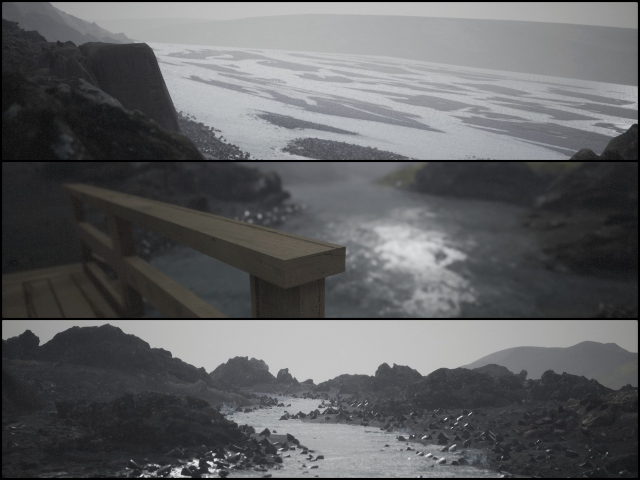
Iceland game sceneries

Now, apart from wandering in the wilderness or the mountains, the player takes the role of a photographer set to re-create a few photographs by roaming around in the Nordic country's landscapes. The reference picures remain stuck on a board and each picture that you re-create, that picture disappears from the board.
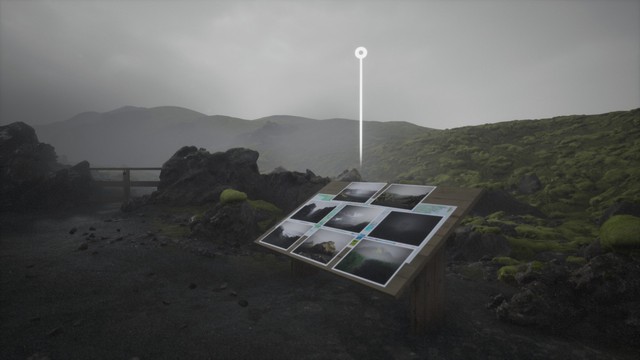
Iceland game 1

After you re-create all the pictures on the board, a new area of the map will unlock for you to continue to exploration. The visuals remain stunning, while the objective remains the same. This game essentially lets you roam around a virtual Iceland with a camera in your hand, and I quite like this concept. Not every game has to have a solid plot or an array of characters. Some games can be as vanilla as this one and still steal the spotlight.

Now, as this is an exploration-based video game, the visuals of this title are absolutely mesmerising. The location, as the game states, is a "realistically inspired-creation of Iceland's southern coast". It includes photo-scanned 3D models of locations made by using Quixel, just like we saw Tristane create his favourite pub. So, the locations in the game represent some of the real-life locations of the country.

Now, during this time of crisis, I think that this game is somewhat of a life-saver for travellers itching to just go out and witness some beautiful natural views. As the global lockdowns along with the travel bans are going on for, what feels like, eternity, this game virtually takes you to Iceland, one of the most beautiful countries in the world.

So, if you wanna check out Mýrdalssandur, Iceland, go to Steam, get the game for free and start exploring Iceland from your living room. Happy virtual journey!

Comments

Popular posts from this blog

Here is the First-Ever Video That Was Posted on YouTube

Here is the First-Ever Video That Was Posted on YouTube By Techtonic group Fifteen years ago, on Valentines' Day of 2005, the domain name "www.youtube.com" went live. The following months saw developments of the website and the first-ever video on the platform was posted on April 23, 2005. The YouTuber who shared the video was none other than one of the founding members, Jawed Karim. The YouTube that we know now is a massive video streaming platform with innumerable audience members. However,  it is fascinating to see from where the platform started its journey . So, in this article, I want to talk about the very first video that was uploaded on the platform, and surprisingly, it still exists. So, the 240p, grainy video, titled "Me at the zoo", shows a 25-year-old Jawed Karim, one of the founders of YouTube, standing in front of a group of elephants at the San Diego Zoo.  The 18-second video went live on April 23, 2005, and it is still there with ove...

10 Best File Manager Apps for Android You Should Use

  Almost all Android smartphones   ship with a built-in File Manager app   today. However, not all OEM file managers offer the level of features and functionality that come with third-party apps on the Google Play Store. So today, we will tell you about the 10 best third-party file manager apps (often also referred to as file browser or file explorer) for Android. These apps will help you better organize your files and folders on an Android smartphone. Best File Manager Apps for Android (Updated May 2021) The best file manager apps on Android let you browse your files, find your downloads, manage your storage space, and more. There are plenty of file managers on Android, and most of them are free. While some of them offer you premium features for a small charge, others are ad-supported. So without any further delay, let’s check out the best file manager apps on Android. Table Of Contents  Note:  The apps mentioned in this article are meant for Android smartphone...

How to Remotely Access Your Raspberry Pi from Windows, Mac, Linux, & Chrome OS

  How to Remotely Access Your Raspberry Pi from Windows, Mac, Linux, & Chrome OS We have already written a detailed guide on  how to use a Windows laptop as a monitor for Raspberry Pi , and it requires a wired ethernet connection. However, if you want to remotely access Raspberry Pi from your Windows 10, Mac, or Linux PC, you can do so with Wi-Fi and VNC server. In this article, we also explain the steps to connect to your Raspberry Pi remotely from a Chromebook in detail. Even if you are a beginner, you can follow the instructions and get it running in a few minutes. So without any delay, let’s go through the tutorial. Remotely Access Raspberry Pi From Windows, Mac, Linux & Chromebook (2021) Before establishing a remote connection, you will need to connect Raspberry Pi to your computer through the  wired ethernet medium for a quick one-time setup . This is essential to connect the Raspberry Pi to your Wi-Fi home network. As a result, an IP address will be assigne...