
Sphero Indi Is a Tiny Robotic Car That Helps Children Learn Programming

"Chernobylite" Let's You Explore the "Exclusion Zone" of Chernobyl


"Chernobylite" Let's You Explore the "Exclusion Zone" of Chernobyl

By Techtonic group

On Saturday, April 26, 1986, one of the most dangerous man-made disasters occurred when there was a nuclear blast in reactor number 4 of the Chernobyl Nuclear Powerplant. The accident released billions of radioactive materials in the air that made the place inhabitable for any form of life. Known as the "Exclusion Zone", the powerplant location near the city of Pripyat in the north of Ukraine has become a ghost town. Now, although we cannot go to Chernobyl physically due to the radiation, we can explore the place and its mysteries through the eerie adventure game, Chernobylite.

Released back on October 16, 2019, Chernobylite is a horror-adventure game that lets you explore the "Exclusion Zone" in Chernobyl. The game puts you right smack in the middle of the eerie, abandoned town of Chernobyl as Igor, the protagonist.

Igor is a nerd kind of guy who is desperately looking for his girlfriend, Tatyana. She mysteriously disappeared during the Chernobyl disaster and Igor is looking for her since then. Now, another element of the game includes "Chernobylite", from which the game derives its name. It is a mysterious component that lets you travel through time. However, this very same material also unleashes scary monsters that Igor has to fight his way through.

Now, the story of the game is quite enticing. However, the most captivating part of the game is exploring "The Zone". Developers of Chernobylite, The Farm 51, used real 3D scanned images of the "Exclusion Zone" to create the game's environment. And it is a job well done as it captures the eerie and creepy environment of the location perfectly.
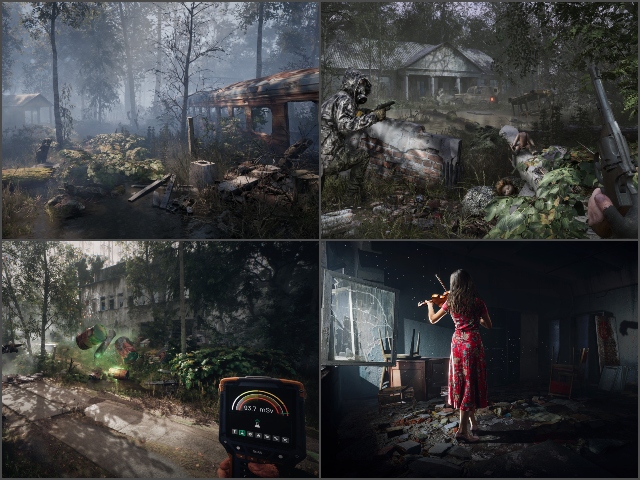
Chernobylite environment

The broken and abandoned buildings, the spooky rides in the parks, and the dense forest with overgrown trees make the perfect setting for a horror adventure. And the frequent encounters with the military and the ghostly monsters make the game even more challenging.

Now, the game is currently in the "Early Access" stage, which means that it is playable alright, however, there are some refinements that the developers need to smooth out still. So, they expect players like us to give them appropriate feedback to improve the game in the future.

You can get "Chernobylite" from Steam for a price of Rs 999 (~$13.20). However, as of writing this article, Steam is giving a promotional discount of 40% till June 1, which lowers the price to Rs 599 (~$7.99).

Comments

Popular posts from this blog

Here is the First-Ever Video That Was Posted on YouTube

Here is the First-Ever Video That Was Posted on YouTube By Techtonic group Fifteen years ago, on Valentines' Day of 2005, the domain name "www.youtube.com" went live. The following months saw developments of the website and the first-ever video on the platform was posted on April 23, 2005. The YouTuber who shared the video was none other than one of the founding members, Jawed Karim. The YouTube that we know now is a massive video streaming platform with innumerable audience members. However,  it is fascinating to see from where the platform started its journey . So, in this article, I want to talk about the very first video that was uploaded on the platform, and surprisingly, it still exists. So, the 240p, grainy video, titled "Me at the zoo", shows a 25-year-old Jawed Karim, one of the founders of YouTube, standing in front of a group of elephants at the San Diego Zoo.  The 18-second video went live on April 23, 2005, and it is still there with ove...

10 Best File Manager Apps for Android You Should Use

  Almost all Android smartphones   ship with a built-in File Manager app   today. However, not all OEM file managers offer the level of features and functionality that come with third-party apps on the Google Play Store. So today, we will tell you about the 10 best third-party file manager apps (often also referred to as file browser or file explorer) for Android. These apps will help you better organize your files and folders on an Android smartphone. Best File Manager Apps for Android (Updated May 2021) The best file manager apps on Android let you browse your files, find your downloads, manage your storage space, and more. There are plenty of file managers on Android, and most of them are free. While some of them offer you premium features for a small charge, others are ad-supported. So without any further delay, let’s check out the best file manager apps on Android. Table Of Contents  Note:  The apps mentioned in this article are meant for Android smartphone...

How to Remotely Access Your Raspberry Pi from Windows, Mac, Linux, & Chrome OS

  How to Remotely Access Your Raspberry Pi from Windows, Mac, Linux, & Chrome OS We have already written a detailed guide on  how to use a Windows laptop as a monitor for Raspberry Pi , and it requires a wired ethernet connection. However, if you want to remotely access Raspberry Pi from your Windows 10, Mac, or Linux PC, you can do so with Wi-Fi and VNC server. In this article, we also explain the steps to connect to your Raspberry Pi remotely from a Chromebook in detail. Even if you are a beginner, you can follow the instructions and get it running in a few minutes. So without any delay, let’s go through the tutorial. Remotely Access Raspberry Pi From Windows, Mac, Linux & Chromebook (2021) Before establishing a remote connection, you will need to connect Raspberry Pi to your computer through the  wired ethernet medium for a quick one-time setup . This is essential to connect the Raspberry Pi to your Wi-Fi home network. As a result, an IP address will be assigne...