
Sphero Indi Is a Tiny Robotic Car That Helps Children Learn Programming

COVID-19 Impact: Global Smartphone Sales Declined 20% in Q1, 2020


COVID-19 Impact: Global Smartphone Sales Declined 20% in Q1, 2020

By Techtonic group

Global smartphone sales declined 20.2 percent in the first quarter of 2020 due to the impact of COVID-19, according to data from US-based research and advisory firm, Gartner. In a report published Monday, the company said that the global lockdowns combined with the economic uncertainty brought on by the coronavirus pandemic led to a major decline in demand for smartphones around the world as consumers stopped spending on nonessential products during the first quarter.

Four out of the top-five smartphone vendors recorded a decline in sales during the Jan-Mar quarter, with the sole exception being Xiaomi. As per the report, the Chinese tech major recorded a slim 1.4 percent growth during the period, propelled largely by strong sales of its budget Redmi devices in international markets.The company's "aggressive online channel focus" also enabled the company to achieve better-than-expected sales, the report said.
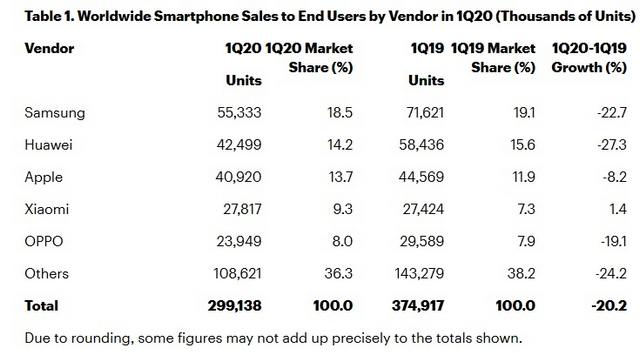
Chart Courtesy: Gartner

Samsung continued to lead the global market with an 18.5 percent marketshare, but its sales dropped 22.7 percent to 55.33 million units. Huawei, at number two, clocked sales of 42.49 million units, having seen its sales plummet 27.3 percent YoY. Apple, at number three, saw an 8.2 percent drop, selling 40.92 million iPhones during the quarter. Xiaomi came in number four with 27.81 million units, while Oppo rounded out the top-five with 23.94 million units, a drop of 24.2 percent.

According to Anshul Gupta, senior research analyst at Gartner, "The coronavirus pandemic caused the global smartphone market to experience its worst decline ever. Most of the leading Chinese manufacturers and Apple were severely impacted by the temporary closures of their factories in China and reduced consumer spending due to the global shelter-in-place (orders)".

Comments

Popular posts from this blog

Here is the First-Ever Video That Was Posted on YouTube

Here is the First-Ever Video That Was Posted on YouTube By Techtonic group Fifteen years ago, on Valentines' Day of 2005, the domain name "www.youtube.com" went live. The following months saw developments of the website and the first-ever video on the platform was posted on April 23, 2005. The YouTuber who shared the video was none other than one of the founding members, Jawed Karim. The YouTube that we know now is a massive video streaming platform with innumerable audience members. However,  it is fascinating to see from where the platform started its journey . So, in this article, I want to talk about the very first video that was uploaded on the platform, and surprisingly, it still exists. So, the 240p, grainy video, titled "Me at the zoo", shows a 25-year-old Jawed Karim, one of the founders of YouTube, standing in front of a group of elephants at the San Diego Zoo.  The 18-second video went live on April 23, 2005, and it is still there with ove...

10 Best File Manager Apps for Android You Should Use

  Almost all Android smartphones   ship with a built-in File Manager app   today. However, not all OEM file managers offer the level of features and functionality that come with third-party apps on the Google Play Store. So today, we will tell you about the 10 best third-party file manager apps (often also referred to as file browser or file explorer) for Android. These apps will help you better organize your files and folders on an Android smartphone. Best File Manager Apps for Android (Updated May 2021) The best file manager apps on Android let you browse your files, find your downloads, manage your storage space, and more. There are plenty of file managers on Android, and most of them are free. While some of them offer you premium features for a small charge, others are ad-supported. So without any further delay, let’s check out the best file manager apps on Android. Table Of Contents  Note:  The apps mentioned in this article are meant for Android smartphone...

How to Remotely Access Your Raspberry Pi from Windows, Mac, Linux, & Chrome OS

  How to Remotely Access Your Raspberry Pi from Windows, Mac, Linux, & Chrome OS We have already written a detailed guide on  how to use a Windows laptop as a monitor for Raspberry Pi , and it requires a wired ethernet connection. However, if you want to remotely access Raspberry Pi from your Windows 10, Mac, or Linux PC, you can do so with Wi-Fi and VNC server. In this article, we also explain the steps to connect to your Raspberry Pi remotely from a Chromebook in detail. Even if you are a beginner, you can follow the instructions and get it running in a few minutes. So without any delay, let’s go through the tutorial. Remotely Access Raspberry Pi From Windows, Mac, Linux & Chromebook (2021) Before establishing a remote connection, you will need to connect Raspberry Pi to your computer through the  wired ethernet medium for a quick one-time setup . This is essential to connect the Raspberry Pi to your Wi-Fi home network. As a result, an IP address will be assigne...