
Sphero Indi Is a Tiny Robotic Car That Helps Children Learn Programming

Google Earth Gets New Search Interface on Web, Android and iOS


Google Earth Gets New Search Interface on Web, Android and iOS

By Techtonic group

Google has recently updated Google Earth with a refreshed search experience that improves the functionality of the service along with visually pleasing design elements contributing to better user experience.

The new search interface shows you places featured in Google Earth and must-see views sourced from Google Earth Voyager. There's an 'I'm feeling lucky' button that randomly picks a place for you as well.
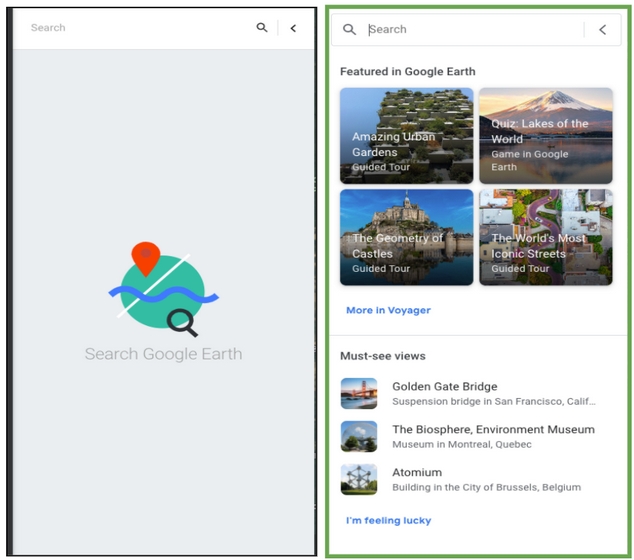
google earth search page
Old vs New UI Image: Google

Moving on to search suggestions, the suggestions are now classified into specific categories such as Places, Games and Quizzes, Data Layers, and Guided Tours. It goes without saying that the category listing for a specific place depends on the amount of data available for that location and hence, you might not necessarily be seeing all these categories for all your location queries.
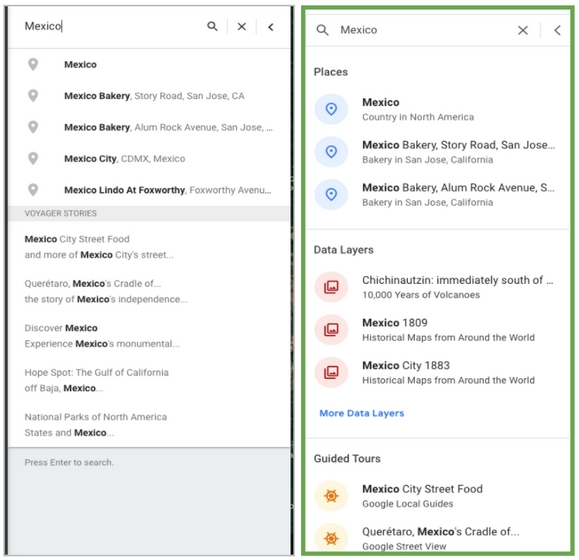
google earth search results
Old vs New UI Image: Google

Once you search and choose a place on Google Earth, it will present the categories in a tabbed layout, as you can see in the image below. You also get personalized search history with this update.
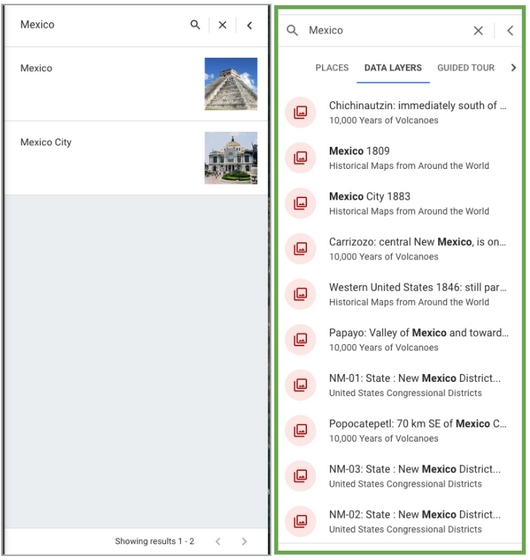
google earth search result tabs
Old vs New UI Image: Google

All these new changes are now live across Android, iOS, and the web version of Google Earth. In case you're not seeing them, make sure your Google Earth app is updated to the latest version available on the Play Store or App Store.

So, if you've been longing to go outside but acted responsibly by staying indoors to contain the spread of coronavirus, now would be a good time to go on a virtual world tour via Google Earth powered by all these search improvements.

Comments

Popular posts from this blog

Here is the First-Ever Video That Was Posted on YouTube

Here is the First-Ever Video That Was Posted on YouTube By Techtonic group Fifteen years ago, on Valentines' Day of 2005, the domain name "www.youtube.com" went live. The following months saw developments of the website and the first-ever video on the platform was posted on April 23, 2005. The YouTuber who shared the video was none other than one of the founding members, Jawed Karim. The YouTube that we know now is a massive video streaming platform with innumerable audience members. However,  it is fascinating to see from where the platform started its journey . So, in this article, I want to talk about the very first video that was uploaded on the platform, and surprisingly, it still exists. So, the 240p, grainy video, titled "Me at the zoo", shows a 25-year-old Jawed Karim, one of the founders of YouTube, standing in front of a group of elephants at the San Diego Zoo.  The 18-second video went live on April 23, 2005, and it is still there with ove...

How to Remotely Access Your Raspberry Pi from Windows, Mac, Linux, & Chrome OS

  How to Remotely Access Your Raspberry Pi from Windows, Mac, Linux, & Chrome OS We have already written a detailed guide on  how to use a Windows laptop as a monitor for Raspberry Pi , and it requires a wired ethernet connection. However, if you want to remotely access Raspberry Pi from your Windows 10, Mac, or Linux PC, you can do so with Wi-Fi and VNC server. In this article, we also explain the steps to connect to your Raspberry Pi remotely from a Chromebook in detail. Even if you are a beginner, you can follow the instructions and get it running in a few minutes. So without any delay, let’s go through the tutorial. Remotely Access Raspberry Pi From Windows, Mac, Linux & Chromebook (2021) Before establishing a remote connection, you will need to connect Raspberry Pi to your computer through the  wired ethernet medium for a quick one-time setup . This is essential to connect the Raspberry Pi to your Wi-Fi home network. As a result, an IP address will be assigne...

Instagram Parteners with Swiggy, Zomato to Let Resturant Add 'Food Order' Stickers in Stories

Instagram Parteners with Swiggy, Zomato to Let Resturant Add 'Food Order' Stickers in Stories By Techtonic group Instagram recently gave users the option to promote small (and local) businesses by placing a sticker in their Stories. Now, the company has partnered with two of India's renowned food delivery apps -  Swiggy and Zomato  - to bring a similar feature to the restaurant owners. It has debuted a new  'Food Order' sticker  that restaurants can include in their Stories to drive sales. The Coronavirus-led lockdown saw almost all restaurants and eateries shut shop for several days. And even when they opened, netizens have been wary to eat outside or order in due to hygiene concerns. Well, as restaurants open up in line with the WHO safety guidelines, they can now head to Instagram to find a new 'Food Orders' sticker in the Stories section. This new sticker is interactive and will  enable users to place food orders  simply by tapping on the sa...