
Prior to the Windows 10 days, users could change the default font of the system pretty easily. For instance, in Windows 7, there is an option to change the font family in the "personalization" settings of the device. Since Windows 10 came to the scenario, Microsoft removed the option to change the system font with the above method. However, if you still want to change your boring default font to one of your choices, then follow this guide.
Now, unlike the method in Windows 7 or older versions, which was pretty easy, the method in Windows 10 involves tinkering with the Registry of the system. So, before you go ahead with this method, let me warn you that editing the Registry keys might damage your system in an irreversible way. So, to avoid that problem, I recommend you to back up your data or make a system restore point before you move ahead.
Steps to Change System Font in Windows 10
Now, that we are in the clear, follow me along with this guide.
1) First, go to "Settings" and open up "Personalization"
2) On the left menu bar, click on "Fonts". This will give you a list of fonts installed your PC or laptop.
3) Click on your preferred font family to open it up.
4) Now, open "Start" and launch the "Notepad" application.
5) Copy the below registry code and paste it on your text field.
Windows Registry Editor Version 5.00[HKEY_LOCAL_MACHINE\SOFTWARE\Microsoft\Windows NT\CurrentVersion\Fonts]
"Segoe UI (TrueType)"=""
"Segoe UI Bold (TrueType)"=""
"Segoe UI Bold Italic (TrueType)"=""
"Segoe UI Italic (TrueType)"=""
"Segoe UI Light (TrueType)"=""
"Segoe UI Semibold (TrueType)"=""
"Segoe UI Symbol (TrueType)"=""
[HKEY_LOCAL_MACHINE\SOFTWARE\Microsoft\Windows NT\CurrentVersion\FontSubstitutes]
"Segoe UI"="ENTER-NEW-FONT-NAME"
6) Now, in the place of "ENTER-NEW-FONT-NAME", enter the exact name of the font that you opened in step 3 inside the quotes.
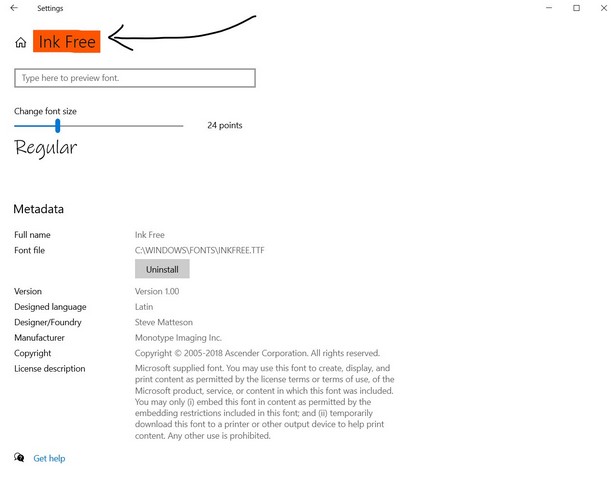
7) After the required change, click on "File" and choose "Save As".
8) In the dialog box which appears, change the file type as "All Files" from the drop-down menu.
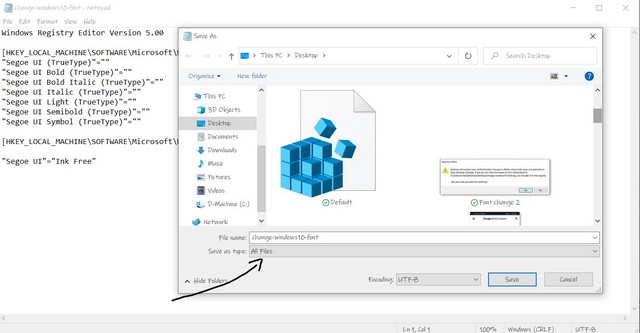
9) Give any name to your file with the ".reg" extension. For example, "change-windows10-font.reg".
10) Click "Save"
11) After it gets saved, right-click on the file and select the "Merge" option from the top.
12) Click "Yes" in the following dialog box.
13) Click "Yes" again.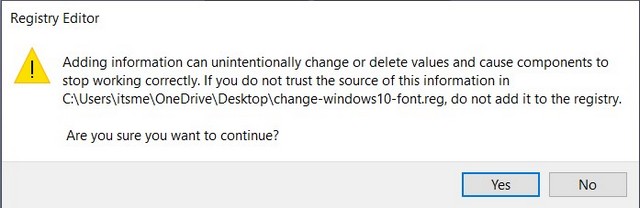
14) Restart your device for the change to take effect.
Now, after the restart of your device, the font of your system will change to your selected style. However, if at any point, you want to go back to your default font style - "Segoe UI", just copy and paste the registry code below and repeat from step 7 to step 14.
Windows Registry Editor Version 5.00[HKEY_LOCAL_MACHINE\SOFTWARE\Microsoft\Windows NT\CurrentVersion\Fonts]
"Segoe UI (TrueType)"="segoeui.ttf"
"Segoe UI Black (TrueType)"="seguibl.ttf"
"Segoe UI Black Italic (TrueType)"="seguibli.ttf"
"Segoe UI Bold (TrueType)"="segoeuib.ttf"
"Segoe UI Bold Italic (TrueType)"="segoeuiz.ttf"
"Segoe UI Emoji (TrueType)"="seguiemj.ttf"
"Segoe UI Historic (TrueType)"="seguihis.ttf"
"Segoe UI Italic (TrueType)"="segoeuii.ttf"
"Segoe UI Light (TrueType)"="segoeuil.ttf"
"Segoe UI Light Italic (TrueType)"="seguili.ttf"
"Segoe UI Semibold (TrueType)"="seguisb.ttf"
"Segoe UI Semibold Italic (TrueType)"="seguisbi.ttf"
"Segoe UI Semilight (TrueType)"="segoeuisl.ttf"
"Segoe UI Semilight Italic (TrueType)"="seguisli.ttf"
"Segoe UI Symbol (TrueType)"="seguisym.ttf"
"Segoe MDL2 Assets (TrueType)"="segmdl2.ttf"
"Segoe Print (TrueType)"="segoepr.ttf"
"Segoe Print Bold (TrueType)"="segoeprb.ttf"
"Segoe Script (TrueType)"="segoesc.ttf"
"Segoe Script Bold (TrueType)"="segoescb.ttf"
[HKEY_LOCAL_MACHINE\SOFTWARE\Microsoft\Windows NT\CurrentVersion\FontSubstitutes]
"Segoe UI"=-
Now, I just want to give you a friendly suggestion. Do not choose a complicated font style for your system font as it might not give you the best results. Choose a simple font family.
I know that this is quite a task for a layman and the previous method to change the font was so much easier. However, I hope this guide helps you to personalise your device with your favourite font.
Comments
Post a Comment