
Mi 10 with 90Hz Display, 108MP Quad-Camera Launches on May 8 in India. By Techtonic group
Xiaomi launched the Mi 10 flagship series, including the Mi 10 and Mi 10 Pro, back in February in China. It boasts a curved display, 108MP quad-camera array, Snapdragon 865 chipset, super-fast wireless charging, and more. Prior to the nationwide lockdown, which derailed the company's plans, Mi 10 was set to launch in India towards the end of March.
Now, as the government eases the lockdown restrictions, Xiaomi has today announced that the Mi 10 5G will launch on 8th May in India. The company took to its official Twitter account to reveal the launch date. And of course, the device will be unveiled via an online live stream instead of anactual on-site event.
This is gonna evoke a lot of excitement.l
This is gonna #EvokeYourImagination.
Mi fans, #Mi10 is launching on MAY 8th.
Yes, justdays to go for the #108MPhttps://twitter.com/hashtag/108MP?src=hash phone and more...
RT if you have been waiting for the launch date.


Xiaomi will bring only the standard Mi 10 to India and not the Mi 10 Pro. It's because the company returns to the premium flagship market after a very long time and all of the units will be imported from China. So, Xiaomi appears to be testing the waters in India with just the non-Pro Mi 10 variant.
Without further ado, let's take a quick look at the specifications of the Mi 10 flagship smartphone:
Mi 10: Specs and Features
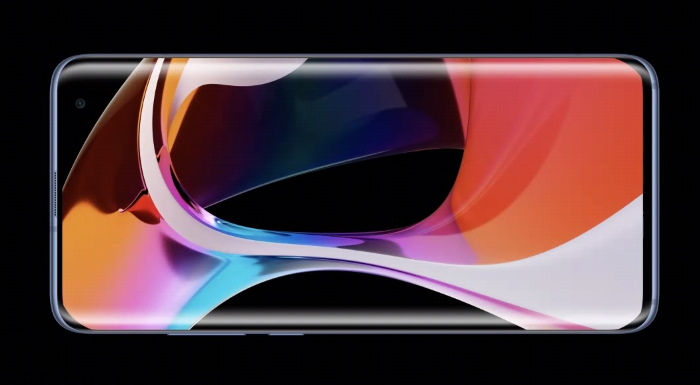
The smartphone features a curvaceous glass-sandwich design, which is resemblant of the Mi Note 10 that launched earlier last year. You have a display curved at both edges and a punch-hole cutout on the front and a quad-camera setup on the rear. There's an in-display fingerprint sensor onboard.
Mi 10 features a 6.67-inch Full-HD+ AMOLED display with a 90Hz refresh rate and 180Hz touch response rate. The panel boasts 2340 x 1080pixel resolution, a peak brightness of 1120 nits, and HDR10+ support. The punch-hole cutout houses a 20MP selfie snapper with 120fps slo-mo video recording support.
Like any other flagship phone, Mi 10 is powered by the Snapdragon 865 chipset from Qualcomm under the hood. You will also find up to 12GB of LPDDR5 RAM and 256GB of UFS 3.0 storage on board, along with a 3000 sq. mm. liquid cooling plate, vapor chamber, and multiple graphene sheets to keep the temperature in check.
Let's talk about software for a bit. Of course, Mi 10 runs Xiaomi's own MIUI 11 skin based on Android 10 out-of-the-box. And we all know how MIUI is riddled with ads and bloatware. Well, if you are planning to buy the Mi 10, you won't have to deal with any of that because Xiaomi is pitching this flagship phone as a "Tier 1 Android device". It will switch out its own Mi-branded apps and bloat for Google apps out-of-the-box on this device.
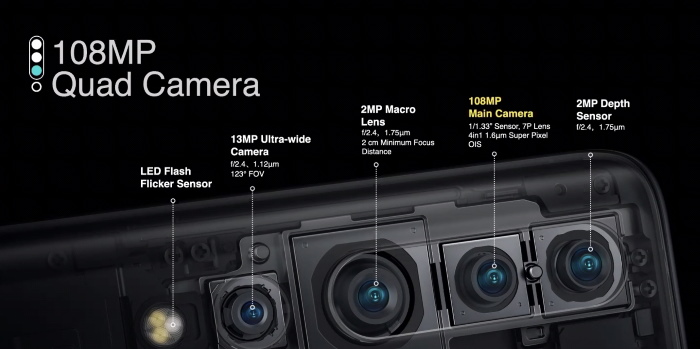
The rear camera system on the Mi 10 is helmed by a 108MP primary sensor with a 7P lens and OIS support. You will find a 13MP (f/2.4) ultra-wide-angle camera with a 123-degree FOV, a 2MP (f/2.4) macro lens, and a 2MP depth sensor to round up the kitty. I bet many of you already know this but the Mi 10 supports 8K video recording at 24fps. This is the one feature that I'm itching to test out.
Mi 10 also comes equipped with a 4,780mAh battery pack, which is moderate. But, the 30W wired and 30W wireless charging support is what makes this flagship phone a lot more desirable. There's 10W reverse wireless charging support on board as well.
If you had to take a guess, what do you think will be the India prices of Xiaomi's Mi 10 flagship smartphone? Share your thoughts with us in the comments section below.
Comments
Post a Comment