
Sphero Indi Is a Tiny Robotic Car That Helps Children Learn Programming

Niantic Brings "Reality Blending" in Pokemon Go


Niantic Brings "Reality Blending" in Pokemon Go

By Techtonic group

Since its launch back in 2016, Pokemon Go became one of the most popular games in the market. As the game heavily uses AR tech to show the cute monsters in the real world, Niantic, the Pokemon Go developers, acquired a computer vision and machine learning company, Matrix Hill to develop the technology. Now, the company has released the result of that acquisition in the game recently that provides a more life-like experience to the players.

The company is calling the feature "Reality Blending". This essentially lets Pokemon detect and interact with real-world objects like trees, poles, or walls that come between the user's camera and the Pokemon. So, now, players can expect a Pokemon to hide behind bushes or trees and jump out in front of the camera to reveal itself.

According to Kjell Bronder, the Senior Product Manager at Niantic, the recent updates aim to create a more realistic AR experience for the players. It will let the players see the virtual monsters in the AR world just like they would see them in the physical world. This means that with this update, your device will be able to recognise an object that blocks you from seeing the pocket monsters right in front.
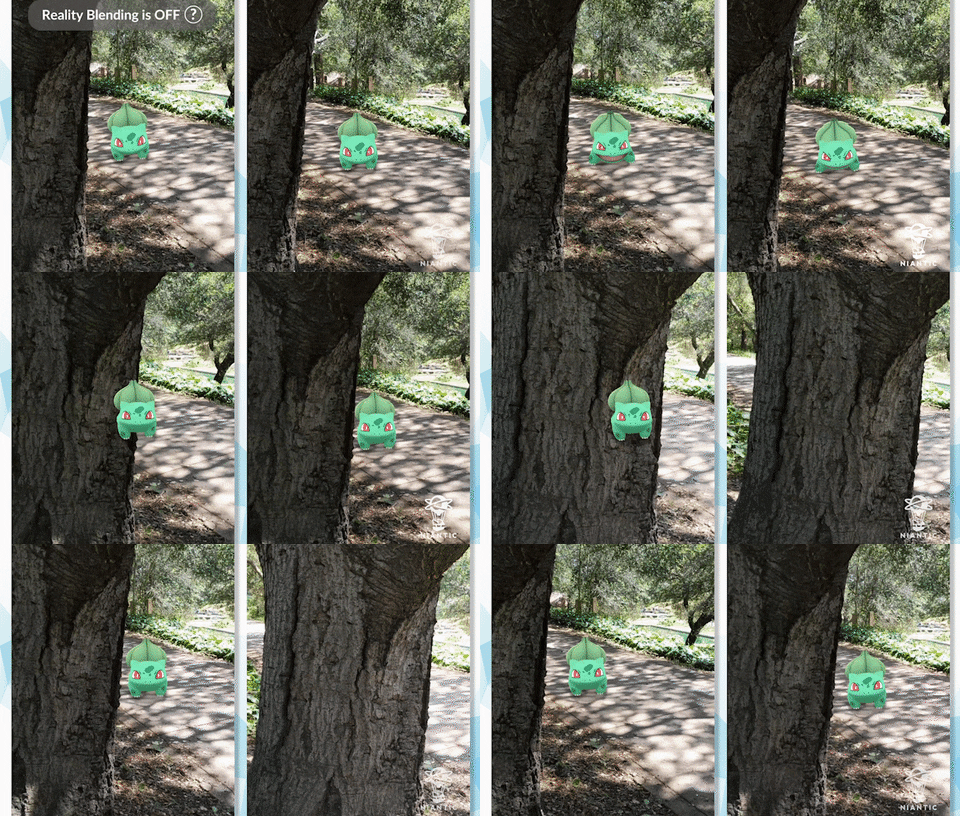
So, when the camera of your device detects such objects in the real world, it will let the Pokemon hide behind those objects. Previously in the game, no matter what came in front, you could still see the Pokemon you are about to catch floating somewhere near that object.

However, with "Reality Blending" on, the pocket-friendly monsters will be able to hide behind the objects. So there will be no more randomly floating Pokemons and the game should deliver a much more realistic AR experience for the players.

Niantic says that the feature is currently only available to select Pokemon Go players using Galaxy S9, S10 or the Google Pixel 3 or 4. However, the feature will be hitting other devices once the company finishes testing it.

Comments

Popular posts from this blog

Here is the First-Ever Video That Was Posted on YouTube

Here is the First-Ever Video That Was Posted on YouTube By Techtonic group Fifteen years ago, on Valentines' Day of 2005, the domain name "www.youtube.com" went live. The following months saw developments of the website and the first-ever video on the platform was posted on April 23, 2005. The YouTuber who shared the video was none other than one of the founding members, Jawed Karim. The YouTube that we know now is a massive video streaming platform with innumerable audience members. However,  it is fascinating to see from where the platform started its journey . So, in this article, I want to talk about the very first video that was uploaded on the platform, and surprisingly, it still exists. So, the 240p, grainy video, titled "Me at the zoo", shows a 25-year-old Jawed Karim, one of the founders of YouTube, standing in front of a group of elephants at the San Diego Zoo.  The 18-second video went live on April 23, 2005, and it is still there with ove...

How to Remotely Access Your Raspberry Pi from Windows, Mac, Linux, & Chrome OS

  How to Remotely Access Your Raspberry Pi from Windows, Mac, Linux, & Chrome OS We have already written a detailed guide on  how to use a Windows laptop as a monitor for Raspberry Pi , and it requires a wired ethernet connection. However, if you want to remotely access Raspberry Pi from your Windows 10, Mac, or Linux PC, you can do so with Wi-Fi and VNC server. In this article, we also explain the steps to connect to your Raspberry Pi remotely from a Chromebook in detail. Even if you are a beginner, you can follow the instructions and get it running in a few minutes. So without any delay, let’s go through the tutorial. Remotely Access Raspberry Pi From Windows, Mac, Linux & Chromebook (2021) Before establishing a remote connection, you will need to connect Raspberry Pi to your computer through the  wired ethernet medium for a quick one-time setup . This is essential to connect the Raspberry Pi to your Wi-Fi home network. As a result, an IP address will be assigne...

Instagram Parteners with Swiggy, Zomato to Let Resturant Add 'Food Order' Stickers in Stories

Instagram Parteners with Swiggy, Zomato to Let Resturant Add 'Food Order' Stickers in Stories By Techtonic group Instagram recently gave users the option to promote small (and local) businesses by placing a sticker in their Stories. Now, the company has partnered with two of India's renowned food delivery apps -  Swiggy and Zomato  - to bring a similar feature to the restaurant owners. It has debuted a new  'Food Order' sticker  that restaurants can include in their Stories to drive sales. The Coronavirus-led lockdown saw almost all restaurants and eateries shut shop for several days. And even when they opened, netizens have been wary to eat outside or order in due to hygiene concerns. Well, as restaurants open up in line with the WHO safety guidelines, they can now head to Instagram to find a new 'Food Orders' sticker in the Stories section. This new sticker is interactive and will  enable users to place food orders  simply by tapping on the sa...