You can sign in to one or more Google accounts simultaneously on both your mobile and PC, but you can’t sign out of one account at a time on the web. Instead, Google forces you to sign out of all accounts at once, even if you only want to log out of one or two accounts. It’s not a problem on Android or iOS devices because you can sign out of Google accounts one at a time. However, that’s not possible on the web. So today, we will show you a nifty workaround that will help you sign out of one Google account on any device when using multiple accounts.
Sign Out of One Google (Gmail) Account When Using Multiple Accounts
The inability to log out of a single Google account at a time may not be a big deal for people who only use one Gmail ID, but it is really inconvenient for folks who manage multiple accounts. This tutorial will show you a trick that will let you sign out of only one Google account on your computer instead of having to sign out of all accounts at once. So without any further ado, let’s check out how you can log out of one Google account while remaining logged in to the rest.
Sign Out of a Single Google Account on Android
On Android, you can sign out of one Google account when using multiple accounts with ease. Here’s how you do it:
- Go to “Settings” from the pull-down notification panel and tap on “Accounts“. On some devices, this might be listed as “Users and Accounts” or something similar.
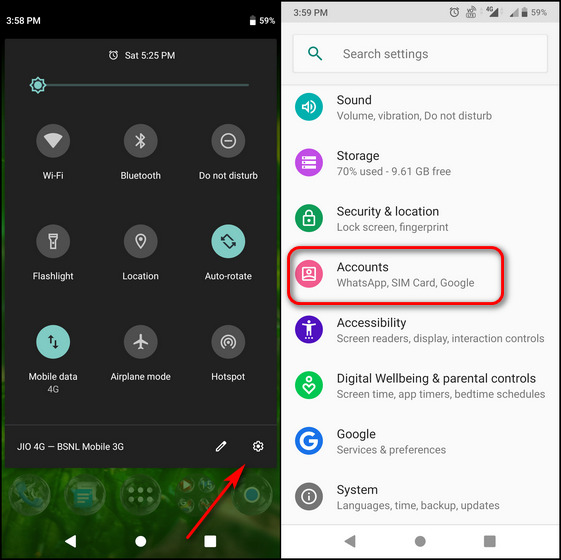
- On the next page, tap on the Google account (or Gmail ID) you want to remove from the device. Finally, hit the “Remove Account” button. Confirm your choice to sign out of that particular account on your Android device.
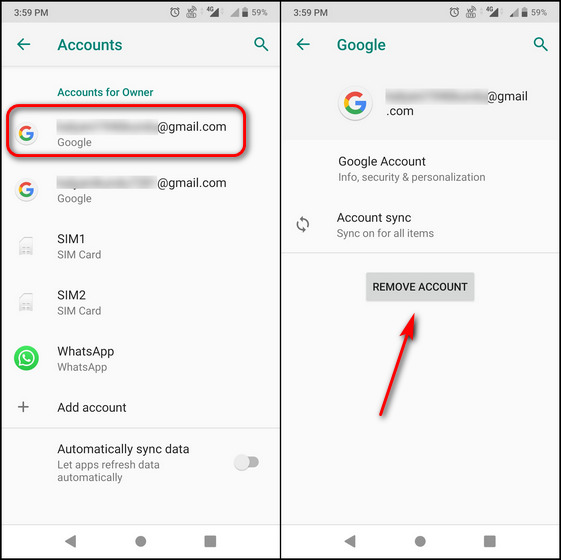
This method will sign you out of one Gmail account while keeping you signed in to the rest of your accounts on that particular Android device.
Sign Out of a Single Google Account on the Web
You cannot directly sign out of a single Google account on the web with the click of a “Sign out” button when using multiple accounts. Instead, you will need to use a second device, either a desktop or mobile, to remotely log out of a single account on the target device. Here’s how it works:
- On your Android smartphone, go to “Settings -> Accounts”, as explained in the first step in the article. Now select the account you want to sign out of and tap on “Google Account“.
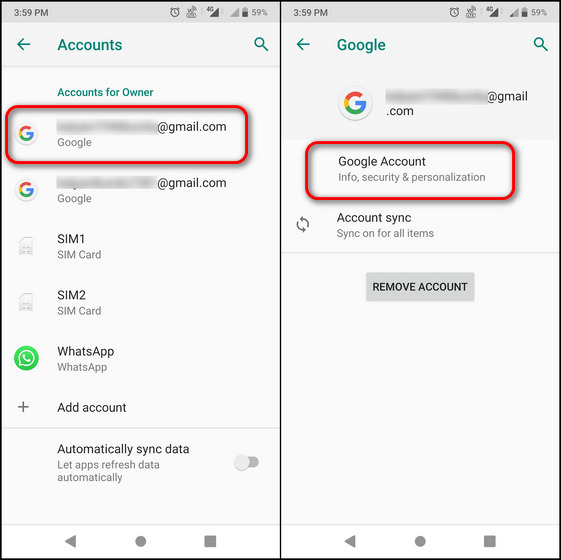
Note: You can also access these settings from any Google app, including Gmail, Google Drive, Google Maps, etc. For that, tap on your profile picture at the top-right corner in these apps and select the account you want to log out of. Then tap on the button that says ‘Google Account’ or ‘Manage Your Google Account’.
- Next, tap on the “Menu” button at the bottom-right and select the “Security” option. You can also directly navigate to the “Security” tab by swiping left on the row under your Google ID.
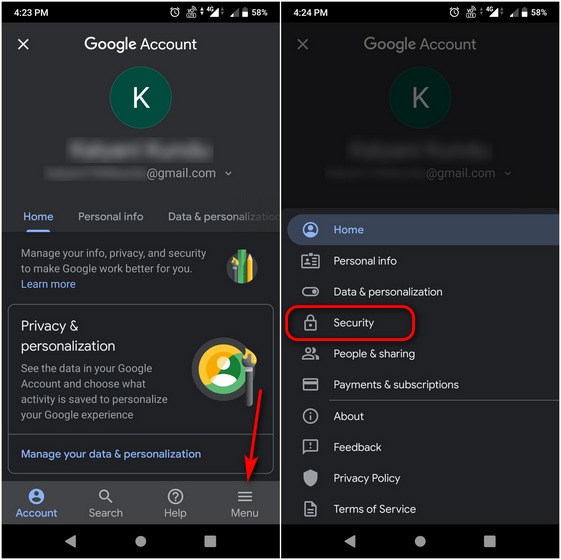
- Now scroll down on the Security page until you see the “Your Devices” section. Here, tap on “Manage devices” to see a list of devices you are logged into with your Google account. On the next page, tap on the three-dot menu button next to the device you want to sign out of. Finally, hit “Sign Out” on the pop-up menu.
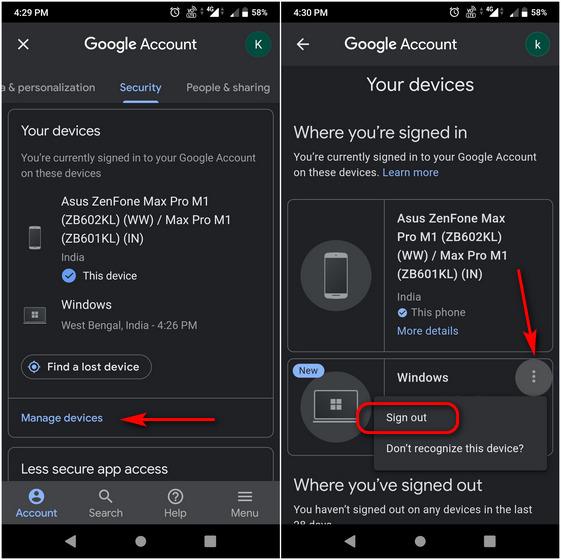
- You can also access the “Manage Devices” page from a desktop browser. Open this link on your Windows 10 or Mac computer and scroll down to the “Your devices” section to see a list of all your devices you’re currently signed into using your Google account. Click on “Manage devices“. Then, from the three-dot menu icon next to the device you want to log out of, select the “Sign out” option.
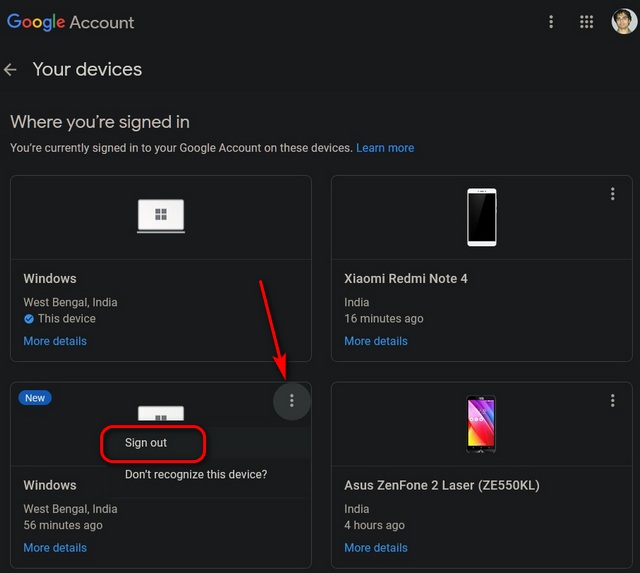
That’s all. Now, you know how to sign out of one Google account when using multiple accounts on your Windows 10 or Mac computer. All of your other Gmail accounts will remain signed in. You can repeat this handy process for as many devices or as many accounts as you want.
Manage Multiple Google Accounts Like a Pro
The workaround described above is not the most convenient, but for now, it’s the only way to sign out of one Google account when using multiple accounts. Let’s hope Google soon rolls out a way to do this directly so that we don’t have to resort to such measures for what should be a simple task. Besides, also check out how you can add or remove guest user accounts on an Android phone and how you can remove your profile photo from your Google account. Finally, learn how you can scrub all traces of Google from your life for good.
by Techtonic Group
Comments
Post a Comment