
Within the past two years, Realme has vastly expanded its portfolio to take on its arch-nemesis - Xiaomi. It started off with smartphones but has since branched into audio products, wearables, and other accessories. Today, the Chinese giant has set foot into the smart TV segment, currently dominated by Mi TVs, with the launch of the Realme Smart TV. It comes in two sizes, 32-inch and 43-inch, to boot and is loaded with features to the brim.
Realme Smart TV: Specs and Features
Let me start off by saying that the Realme Smart TV lineup is launching only with an HD-ready 32-inch and Full-HD 43-inch model. It's merely the resolution that's different in both variants while the rest of the specifications remain the same. Realme plans to launch more screen sizes, possibly bigger ones with 4K resolution support, in the future.
Design and Display
Right off the bat, one thing about the Realme Smart TV that will stand out to you is the premium-looking bezel-less design. It's an LED-backlit panel with bezels as thin as 8.7mm at the top and around the sides, as per the press release. The bottom bezel is slightly thicker to accommodate the Realme logo but the TV looks quite appealing. You can either prop up the Realme Smart TV or wall-mount it, depends on your liking.
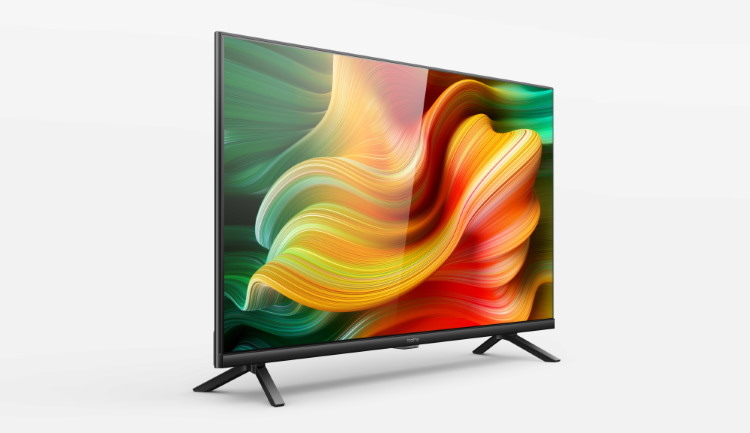
Both the 32-inch and 43-inch smart TVs are backed by the Chroma Boost Picture Engine to "enhance the overall picture quality and improves the brightness, color, contrast, and clarity to deliver stunning visuals." The TVs support up to 400 nits of brightness, up to 178-degree viewing angles, HDR10/ HLG support, and seven display modes.
Internals
Under the hood, Realme Smart TV is powered by a quad-core 64-bit MediaTek chipset (featuring ARM Cortex A53 CPU, clocked at up to 1.1GHz) and Mali-470 MP3 GPU. There's 1GB of 2133MHz RAM and 8GB of built-in storage board both the TVs. This seems a bit less in comparison to other smart TVs in this segment usually include up to 2GB RAM and 16GB storage.
These two smart TVs also include 24W quad-speaker with Dolby Audio support at the bottom. There's two sets of speakers on each side (12W), including one full-range speaker (handles lows and mids) and one tweeter (handles high frequencies).
Software
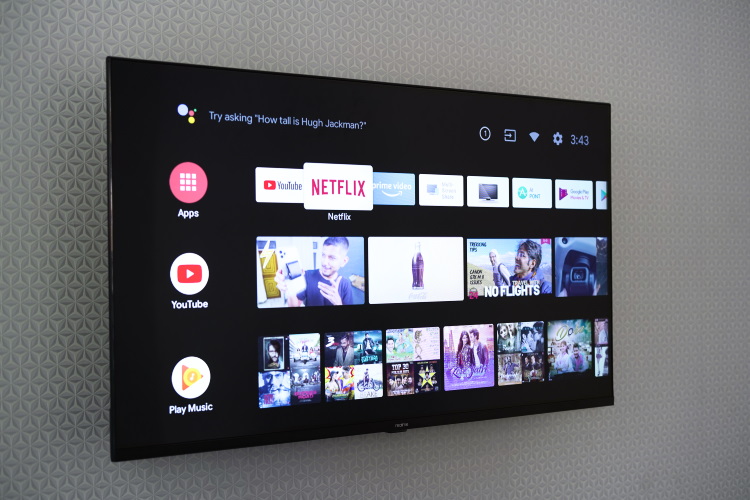
Realme Smart TV runs vanilla Android TV 9.0, which is Google's latest OS for television sets. There's no bloated skin on top and that's amazing. You have YouTube, Netflix, and Prime Video pre-installed onboard, so you can jump in and start enjoying content to your heart's content. If you want access to more games or streaming apps, you can always head to the Google Play Store that comes pre-installed on board.
You also get access to the Google Assistant on Realme Smart TV. It enables you to get answers to queries, play content, and most importantly, control your smart home from your smart TV.
Connectivity
Speaking of the ports, the placement looks the same across both the variants. Realme Smart TV includes 3x HDMI, 2x USB, 1x Ethernet, 1x SPDIF, 1x AV port, 1x antenna in port, and a 3.5mm audio jack.
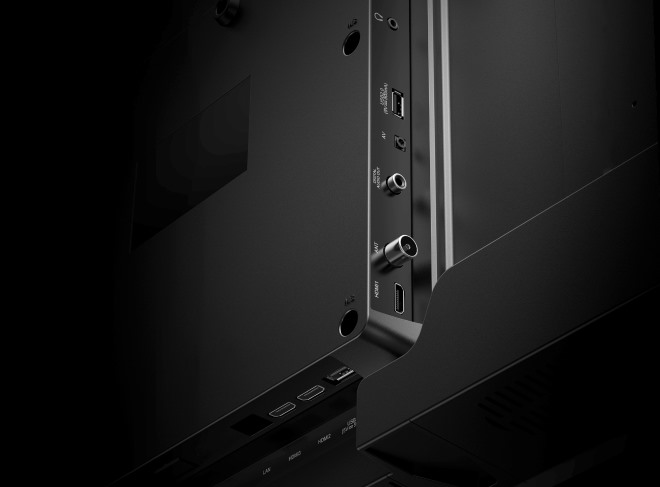
Other connectivity options include 2.4GHz WiFi (yes, you can't connect to a high-speed 5GHz network), Bluetooth 5.0, Infrared, and more. Realme Smart TV only includes a stand and not a wall mount inside the box. So, if you want to mount the smart TV, you will have to get that installed separately.
Realme Smart TV: Remote
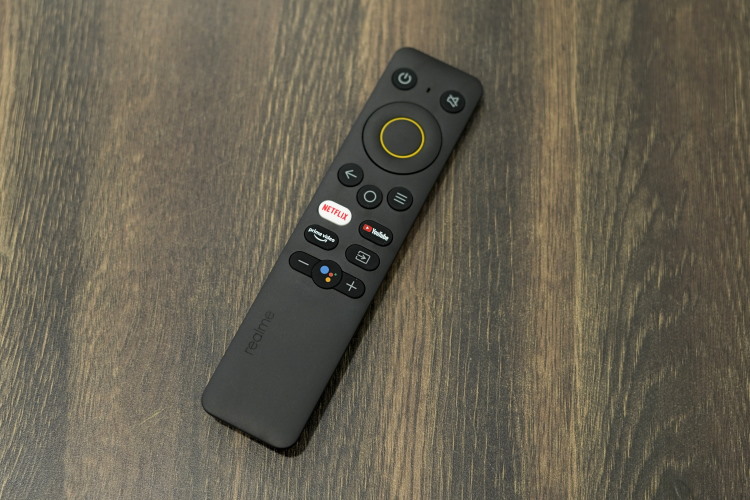
Now, let's take a quick look at the Realme Smart TV remote before we talk about the pricing and availability. This remote isn't nimble like the OnePlus TV remote instead, it's chunky and feature-packed. It includes a circular button, flanked by the power on/ off button and mute switch at the top. The home, settings, and back button sit right below it.
You can obviously see quick buttons for Netflix, YouTube, and Prime Video sitting toward the bottom. There's also the input source selection button next to it, which will come in handy when you want to switch to your local cable connection.
The remote can be operated both via infrared and Bluetooth. You, however, need to connect the remote over Bluetooth to access the Google Assistant via the hotkey. The remote comes with built-in mics to let you activate the assistant.
Realme Smart TV: Price and Availability
The 32-inch Realme Smart TV is priced at Rs. 12,999 whereas the 43-inch variant will see you shell out Rs. 21,999 for the larger screen and higher resolution. Both of these smart TVs will go on sale starting from 2nd June on Flipkart and Realme's website.
Comments
Post a Comment