
Sphero Indi Is a Tiny Robotic Car That Helps Children Learn Programming

This is the Warfare-Ready Galaxy S20 Tactical Edition Designed for the Military


This is the Warfare-Ready Galaxy S20 Tactical Edition Designed for the Military

By Techtonic group

Samsung unveiled the Galaxy 20 series of smartphones earlier this year. Following the release, we saw a special gold edition Galaxy S20 made by a third-party manufacturer. However, now there is an official Galaxy S20 Tactical Edition (TE), that is made by Samsung themselves.

The Seoul-based tech giant announced the release of the Galaxy S20 TE recently. According to Samsung, this smartphone marks the beginning of the "next generation of tactical mobility" and it is specifically designed for military operations and secure data retention.

Now, the Galaxy S20 TE looks quite rugged, however, it is still your normal Galaxy S20, spec-wise. However, as the device is tailored for the military and the Department of Defence personnel, it comes with some extra perks that make the smartphone warfare-ready.
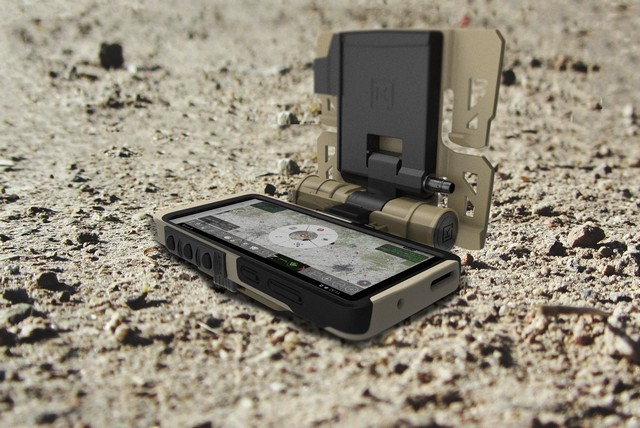
Samsung S20 TE 1 (2)

“The development of this solution is a result of coordination and feedback received from our Department of Defense customers and partners,” said Taher Behbehani, Head of the Mobile B2B Divison, SVP and GM of Samsung Electronics in North America.

Now, apart from running all mission control apps needed for military operations out of the box, the device has multi-ethernet capabilities that provide dedicated connections to mission systems. The network support for Private SIM, 5G, Wi-Fi 6, and CBRS ensures a stable connection all through multi-domain environments.
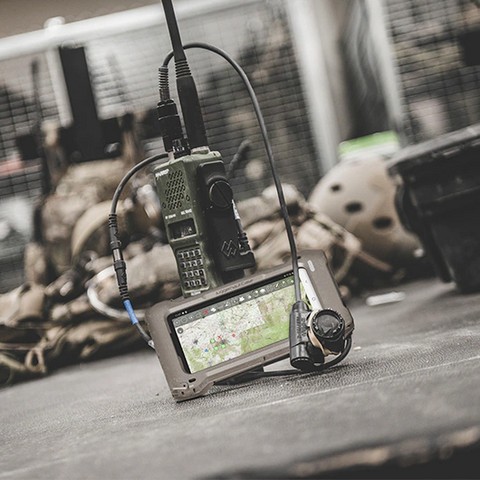
Samsung S20 TE 2

Apart from these features, the Samsung Galaxy S20 TE also has a top-class security system to store and deliver sensitive data securely. It is built on Samsung Knox, which is a defense-grade mobile security system. The device also features the DualDAR architecture that further secures the smartphone using two layers of encryption which can securely store the top-secret information and prevent any unwanted user to access it.
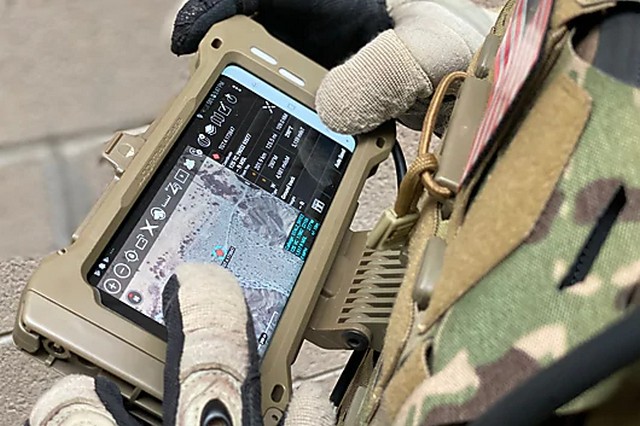
Samsung S20 TE 3

In addition to the above features, the smartphone comes with two unique modes -- the Night Mode and the Stealth Mode. These two modes make the device much more efficient in the field during military missions and help the operators access the device much more easily.

The Galaxy S20 TE is usable in the Department of Defense out of the box using the Android 10 Security Technical Implementation Guide (STIG). It will be available sometime around Q3 of 2020 and will be sold via selected IT channel partners.

Comments

Popular posts from this blog

Here is the First-Ever Video That Was Posted on YouTube

Here is the First-Ever Video That Was Posted on YouTube By Techtonic group Fifteen years ago, on Valentines' Day of 2005, the domain name "www.youtube.com" went live. The following months saw developments of the website and the first-ever video on the platform was posted on April 23, 2005. The YouTuber who shared the video was none other than one of the founding members, Jawed Karim. The YouTube that we know now is a massive video streaming platform with innumerable audience members. However,  it is fascinating to see from where the platform started its journey . So, in this article, I want to talk about the very first video that was uploaded on the platform, and surprisingly, it still exists. So, the 240p, grainy video, titled "Me at the zoo", shows a 25-year-old Jawed Karim, one of the founders of YouTube, standing in front of a group of elephants at the San Diego Zoo.  The 18-second video went live on April 23, 2005, and it is still there with ove...

10 Best File Manager Apps for Android You Should Use

  Almost all Android smartphones   ship with a built-in File Manager app   today. However, not all OEM file managers offer the level of features and functionality that come with third-party apps on the Google Play Store. So today, we will tell you about the 10 best third-party file manager apps (often also referred to as file browser or file explorer) for Android. These apps will help you better organize your files and folders on an Android smartphone. Best File Manager Apps for Android (Updated May 2021) The best file manager apps on Android let you browse your files, find your downloads, manage your storage space, and more. There are plenty of file managers on Android, and most of them are free. While some of them offer you premium features for a small charge, others are ad-supported. So without any further delay, let’s check out the best file manager apps on Android. Table Of Contents  Note:  The apps mentioned in this article are meant for Android smartphone...

How to Remotely Access Your Raspberry Pi from Windows, Mac, Linux, & Chrome OS

  How to Remotely Access Your Raspberry Pi from Windows, Mac, Linux, & Chrome OS We have already written a detailed guide on  how to use a Windows laptop as a monitor for Raspberry Pi , and it requires a wired ethernet connection. However, if you want to remotely access Raspberry Pi from your Windows 10, Mac, or Linux PC, you can do so with Wi-Fi and VNC server. In this article, we also explain the steps to connect to your Raspberry Pi remotely from a Chromebook in detail. Even if you are a beginner, you can follow the instructions and get it running in a few minutes. So without any delay, let’s go through the tutorial. Remotely Access Raspberry Pi From Windows, Mac, Linux & Chromebook (2021) Before establishing a remote connection, you will need to connect Raspberry Pi to your computer through the  wired ethernet medium for a quick one-time setup . This is essential to connect the Raspberry Pi to your Wi-Fi home network. As a result, an IP address will be assigne...