
Sphero Indi Is a Tiny Robotic Car That Helps Children Learn Programming

Truecaller Redesign Adds Fullscreen Caller ID, Important SMS App in India


Truecaller Redesign Adds Fullscreen Caller ID, Important SMS App in India

By Techtonic group

The most popular caller ID app, Truecaller, has completely redesigned its mobile app to make it efficient for users to access their call history, SMS, and more. Truecaller is still offering a minimal and clean UI but revamps the home tab to show more info. It also replaces the intrusive caller ID pop-up with a full-screen alternative on Android. Also, a smart SMS feature has been added to the mix for Indian users.

  • Revamped Home Screen

Once you update the Truecaller app, the first noticeable change will be the revamped home screen. The design has always been minimal and simple but the app now shows both your call history and messages under one roof - on the home screen.
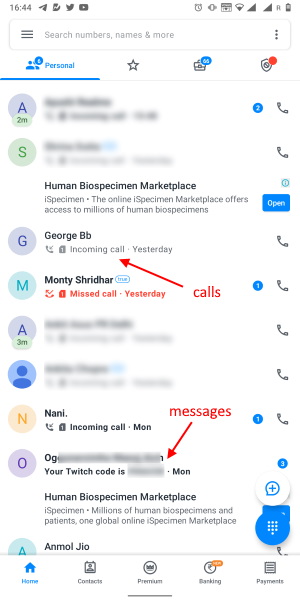
You can tap the profile picture to see contact details or tap the name to open the built-in chat messenger. It also lets you place voice calls to the recipient's Truecaller app.

  • Full-screen Caller ID

Do you find Truecaller's Caller ID pop-ups annoying? I certainly do and so do a lot of other users because it covers up the dialer buttons on several occasions. That's exactly what Truecaller gathered in user feedback. Hence, the company has today debuted a new fullscreen Caller ID solution to replace the annoying pop-ups.
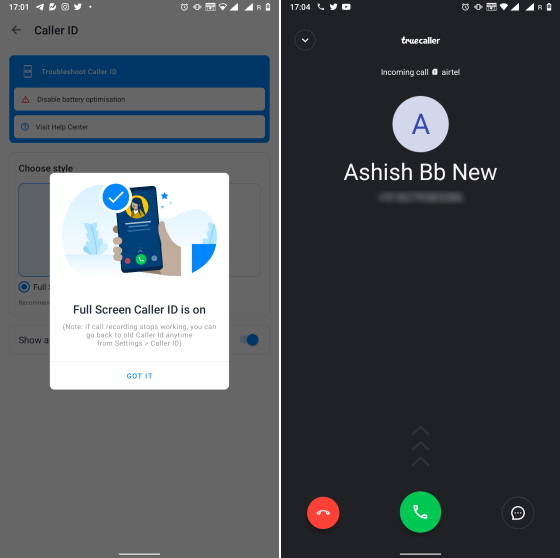
The fullscreen Caller ID is disabled by default but you can jump into the 'Caller ID' Settings and pick the 'Full Screen' style. It replaces the current dialer and continues to identify callers, spammers, and more. You will also see ads on the fullscreen Caller ID if you are not a premium user.

  • Important SMS Tab

Truecaller already helps sort the message inbox, identifying and putting spam under a separate tab. The app builds on this feature with the addition of an 'Important' tab. It's merely a left-swipe away from the home screen and helps keep track of payments, bills, and other important notifications in a minimal fashion. This is an India-first feature for Android users.
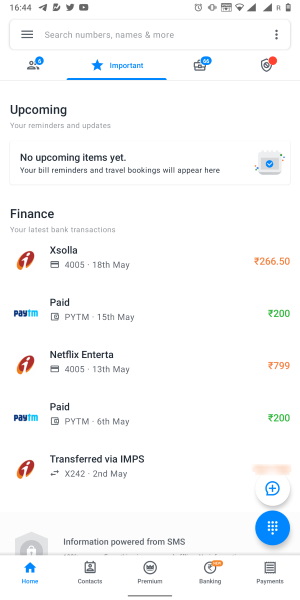
truecaller important SMS tab

You will reminders and updates for upcoming payments at the very top. Truecaller also plans on "adding in the coming months travel reminders like flight delays, bus seat allocation and live tracking, and updates on postal deliveries, tax updates, and hospital appointments," as per the blog post.

If you want a take a quick look at the revamped Truecaller app, check out this YouTube video. Truecaller currently has over 300 million users, with India making up for close to 70% of that massive userbase. The app has garnered over 1 million subscribers for its premium service globally. The UPI payments, flash messaging, and other features still make an appearance in the app.


Comments

Popular posts from this blog

Here is the First-Ever Video That Was Posted on YouTube

Here is the First-Ever Video That Was Posted on YouTube By Techtonic group Fifteen years ago, on Valentines' Day of 2005, the domain name "www.youtube.com" went live. The following months saw developments of the website and the first-ever video on the platform was posted on April 23, 2005. The YouTuber who shared the video was none other than one of the founding members, Jawed Karim. The YouTube that we know now is a massive video streaming platform with innumerable audience members. However,  it is fascinating to see from where the platform started its journey . So, in this article, I want to talk about the very first video that was uploaded on the platform, and surprisingly, it still exists. So, the 240p, grainy video, titled "Me at the zoo", shows a 25-year-old Jawed Karim, one of the founders of YouTube, standing in front of a group of elephants at the San Diego Zoo.  The 18-second video went live on April 23, 2005, and it is still there with ove...

10 Best File Manager Apps for Android You Should Use

  Almost all Android smartphones   ship with a built-in File Manager app   today. However, not all OEM file managers offer the level of features and functionality that come with third-party apps on the Google Play Store. So today, we will tell you about the 10 best third-party file manager apps (often also referred to as file browser or file explorer) for Android. These apps will help you better organize your files and folders on an Android smartphone. Best File Manager Apps for Android (Updated May 2021) The best file manager apps on Android let you browse your files, find your downloads, manage your storage space, and more. There are plenty of file managers on Android, and most of them are free. While some of them offer you premium features for a small charge, others are ad-supported. So without any further delay, let’s check out the best file manager apps on Android. Table Of Contents  Note:  The apps mentioned in this article are meant for Android smartphone...

How to Remotely Access Your Raspberry Pi from Windows, Mac, Linux, & Chrome OS

  How to Remotely Access Your Raspberry Pi from Windows, Mac, Linux, & Chrome OS We have already written a detailed guide on  how to use a Windows laptop as a monitor for Raspberry Pi , and it requires a wired ethernet connection. However, if you want to remotely access Raspberry Pi from your Windows 10, Mac, or Linux PC, you can do so with Wi-Fi and VNC server. In this article, we also explain the steps to connect to your Raspberry Pi remotely from a Chromebook in detail. Even if you are a beginner, you can follow the instructions and get it running in a few minutes. So without any delay, let’s go through the tutorial. Remotely Access Raspberry Pi From Windows, Mac, Linux & Chromebook (2021) Before establishing a remote connection, you will need to connect Raspberry Pi to your computer through the  wired ethernet medium for a quick one-time setup . This is essential to connect the Raspberry Pi to your Wi-Fi home network. As a result, an IP address will be assigne...