
Sphero Indi Is a Tiny Robotic Car That Helps Children Learn Programming

Xiaomi Launches Mi Box 4K with HDR 10, Google Assistant Support In India


Xiaomi Launches Mi Box 4K with HDR 10, Google Assistant Support In India

By Techtonic group

Xiaomi disrupted the smart TV segment in India and now assumes the pole position, with over 32 percent market share in Q4 2019. The company's already made it pretty affordable for users to choose a smart TV over a standard LED or LCD TV. And now, Xiaomi wants to give more users access to the plethora of online content and smart features with the launch of the Mi Box 4K set-top box in India.

Mi Box 4K: Specs and Features

This is the first set-top box from Xiaomi to land in India. Mi Box 4K is a rebranded version of Mi Box S that was launched in the US back in late-2018. As seen in the image above, Mi Box 4K is really a small box that you can connect to your basic, non-smart TV and bring smart TV features to it.

Mi Box 4K comes with 4K output support but it can dynamically adjust the same based on your TV set. It also supports HDR 10, Dolby Audio, and DTS out-of-the-box. It is backed by a 64-bit processor with a clock speed up to 2.0GHz, Mali-450 GPU clocked at 750MHz, 2GB of RAM, and 8GB of eMMC storage.
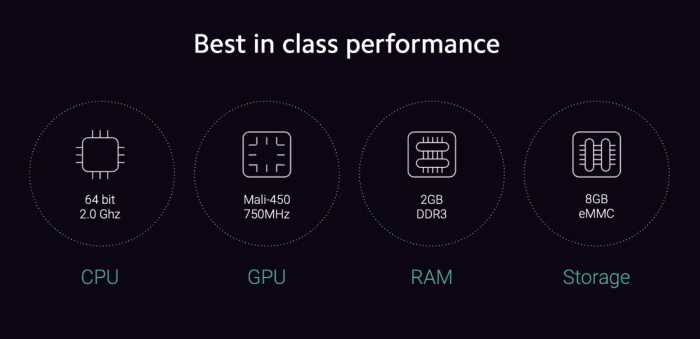
mi box 4k specs

Mi Box 4K is powered by the latest Android TV 9.0 out-of-the-box. This means you'll get access to Chromecast built-in (supports 4K casting), data saver to consume less data while streaming and keep you up to date with our current usage, and Google Assistant support. Simply hit the Google Assistant button on the Mi Remote to ask questions or control your smart home devices.

The device comes with Netflix, Prime Video, Disney+ Hotstar, and YouTube apps pre-installed. But, you can head to the access over 5,000 apps from the Google Play Store baked into Android TV. And while we expected Xiaomi to plaster its PatchWall UI atop stock Android TV, that doesn't seem to be the case here.
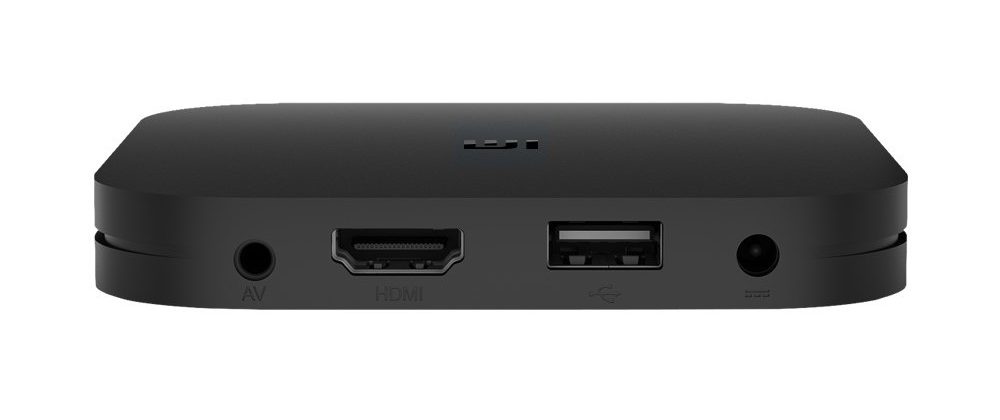
Xiaomi-Mi-Box-ports

As you can see in the image above, Mi Box also includes a USB 2.0, HDMI 2.0a, power input, and audio output on the rear. It means you can connect your own audio devices (home theater or woofers) to this set-top box to boost the output. Mi Box 4K supports Bluetooth 4.1 and WiFi 802.11ac, which is great.

Price and Availability

Xiaomi has priced the Mi Box 4K at Rs. 3,499 in India, undercutting Amazon Fire TV Stick 4K by a considerable margin. It will go on sale from 11th May on Flipkart, Xiaomi's official website, and offline stores.

Comments

Popular posts from this blog

Instagram Parteners with Swiggy, Zomato to Let Resturant Add 'Food Order' Stickers in Stories

Instagram Parteners with Swiggy, Zomato to Let Resturant Add 'Food Order' Stickers in Stories By Techtonic group Instagram recently gave users the option to promote small (and local) businesses by placing a sticker in their Stories. Now, the company has partnered with two of India's renowned food delivery apps -  Swiggy and Zomato  - to bring a similar feature to the restaurant owners. It has debuted a new  'Food Order' sticker  that restaurants can include in their Stories to drive sales. The Coronavirus-led lockdown saw almost all restaurants and eateries shut shop for several days. And even when they opened, netizens have been wary to eat outside or order in due to hygiene concerns. Well, as restaurants open up in line with the WHO safety guidelines, they can now head to Instagram to find a new 'Food Orders' sticker in the Stories section. This new sticker is interactive and will  enable users to place food orders  simply by tapping on the sa...

Sphero Indi Is a Tiny Robotic Car That Helps Children Learn Programming

Robotic toys for learning are becoming more common in the market as kids turn more towards STEM learning. As a result, we’ve seen several modular and advanced robotic toys that are designed to help children learn the basic concepts of programming and problem-solving. And the Sphero indi is not that different. The Sphero indi Developed by renowned robotic-toy maker Sphero, the indi is essentially a toy car that helps children learn about the core concepts of problem-solving and logical thinking. The learning set comes with the indi, which the tiny robotic car, and a bunch of color-coded silicone-based tiles, designed to give the indi specific instructions. For instance, a green tile tells the car to move faster, a pink tile tells it to turn left, a yellow one instructs the car to drive slowly, and a red tile stops the car. So, the car comes equipped with a color sensor to detect the color of a tile over which it is driving and respond accordingly. Hence, using the Sph...

How to Remotely Access Your Raspberry Pi from Windows, Mac, Linux, & Chrome OS

  How to Remotely Access Your Raspberry Pi from Windows, Mac, Linux, & Chrome OS We have already written a detailed guide on  how to use a Windows laptop as a monitor for Raspberry Pi , and it requires a wired ethernet connection. However, if you want to remotely access Raspberry Pi from your Windows 10, Mac, or Linux PC, you can do so with Wi-Fi and VNC server. In this article, we also explain the steps to connect to your Raspberry Pi remotely from a Chromebook in detail. Even if you are a beginner, you can follow the instructions and get it running in a few minutes. So without any delay, let’s go through the tutorial. Remotely Access Raspberry Pi From Windows, Mac, Linux & Chromebook (2021) Before establishing a remote connection, you will need to connect Raspberry Pi to your computer through the  wired ethernet medium for a quick one-time setup . This is essential to connect the Raspberry Pi to your Wi-Fi home network. As a result, an IP address will be assigne...