
If your website is not using SSL encryption in 2020, you are doing a lot of harm to your business. SSL certification is not just for securing your website, it's also to give your visitors peace of mind when they visit your website. Also, Google punishes websites that don't offer SSL encryption. So your website will not rank high in Google's search results. That being said, it's hard to find a good SSL provider with affordable pricing. If that's what has stopped you from using SSL certificates on your website, it's time to change. In this article, we are featuring ZeroSSL. It's a service that provides fast and free SSL protection for everyone. In this article, we are going to take a quick look at all its features and see what it brings to the table.
Key Features
In this article, we are first going to focus on the key features of ZeroSSL. Then we are going to see how easy or hard it is to get an SSL certificate from ZeroSSL. And finally, we will get into pricing and availability. So, let's start with the key features, shall we?
1. Get Full Protection
ZeroSSL brings full protection to any domain, website, or backend by issuing free SSL certificates. You can get an SSL protection for your website in under five minutes.
2. Quick Validation
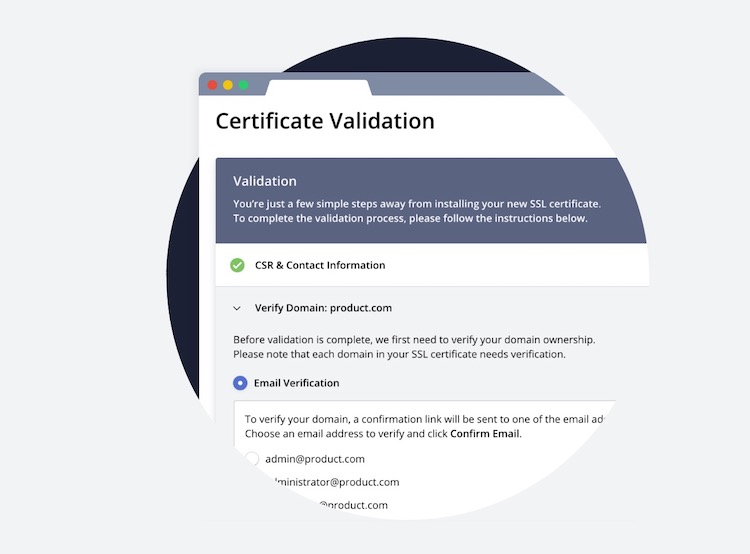
One of the major problems with obtaining an SSL certification is it may take a long time. This can be detrimental to your business if you are launching a new product and need an SSL protected domain. ZeroSSL solves this problem by allowing you to get both new and existing SSL certificates approved within a matter of seconds, using one-step email validation, server uploads, or CNAME verification.
3. SSL REST API
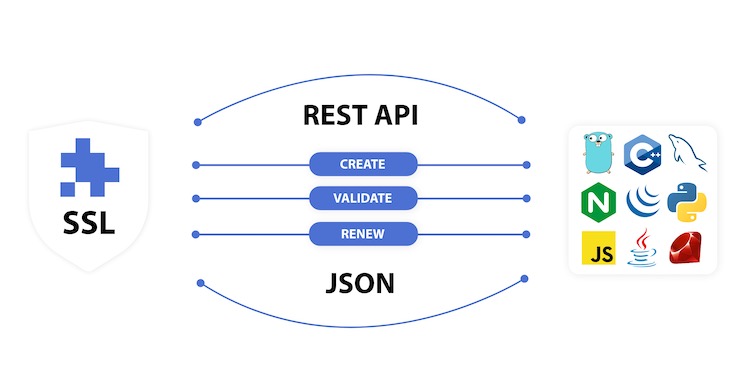
ZeroSSL also offers an SSL REST API that saves users both time and money by automating SSL certificate management, supporting certificate issuance, CSR validation, and more. It lets you automate any tasks, usually taken care of manually in the management console, including the creation of new SSL certificates, validation, cancellation, deletion, and more.
4. Automatic Certificate Management Environment (ACME) Integrations
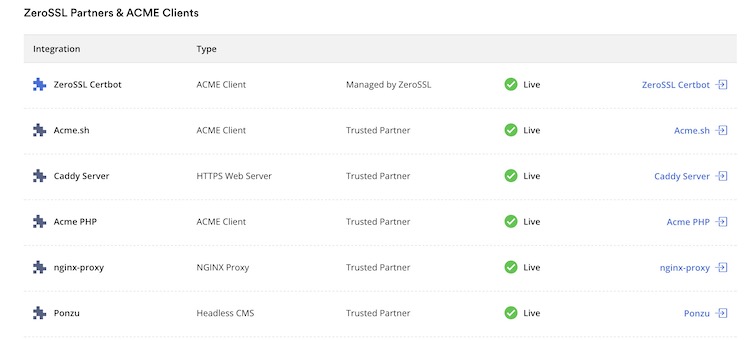
ZeroSSL has partnered with some of the biggest ACME providers, thereby allowing users to manage and renew existing certificates without ever lifting a finger. The company is even testing its own ACME Server (in BETA right now) that will be released in May and will make the entire process even more seamless.
5. SSL Monitoring
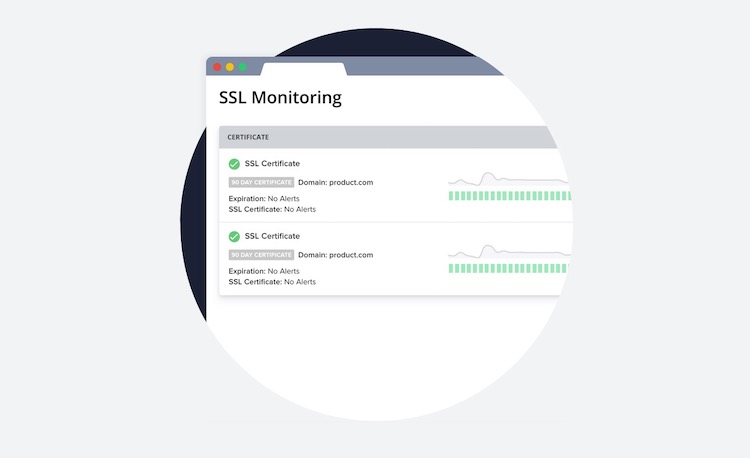
Getting an SSL certificate for your domain or website is just the first step. You also need to make sure that your SSL certificates are working properly. ZeroSSL helps in this task by running a series of automated health checks on all of your SSL certificates. Checks include the status and expiration monitors, connection checks, response body substring lookups, and more. It is also capable of detecting whether or not HTTP errors occur when a user tries to access your SSL certificates.
User Interface and Ease of Use
For creating and using something as technical as SSL certificates, ZeroSSL is very easy to use. All you need to do is visit its website and sign-up with a free account. The sign-up process takes a few seconds, and you are presented with your dashboard. As you can see in the picture below, from here, you can track the status of your SSL certificates and apply for new ones.
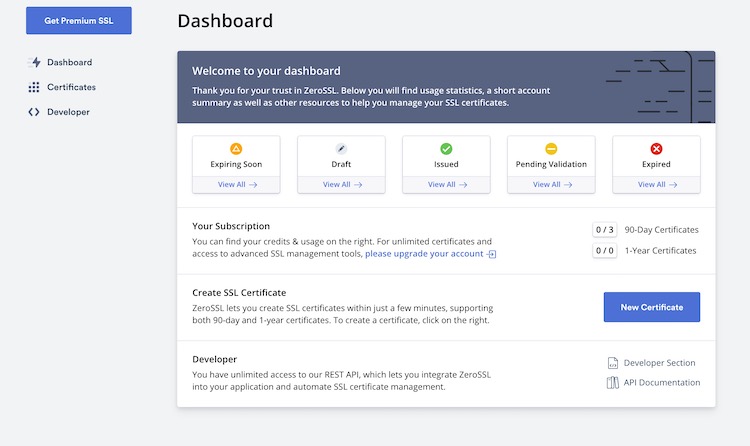
To apply for a new SSL certificate, click on the "New certificate button". Here, all you need to do is enter a domain name and click on the "Next" button to proceed.
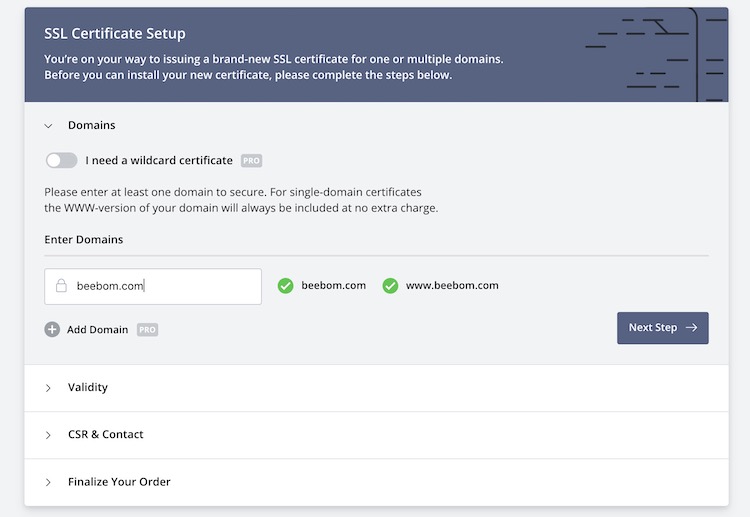
Now you need to select the certificate validity. You can find both paid and free options here. We will talk more about pricing in the next section. The next two-steps are pretty easy. All you need to do is generate your CSR information and finalize your order.
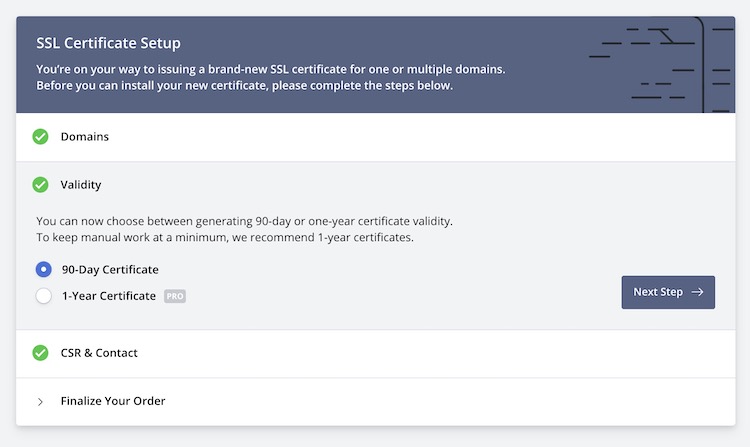
Generating SSL certificates doesn't get any easier than that. Once you have applied for a certificate, go back to your dashboard to keep track of your application. And if you are using ZeroSSL's REST API, you can do most of the work automatically.
ZeroSSL vs Competition
Before discussing the pricing of the product, let us first talk briefly about the competition. When it comes to free SSL certification, "Let's Encrypt" is one of the most popular options. ZeroSSL is the first real alternative to Let’s Encrypt, offering completely free SSL certificates through an easy-to-use UI and API. ZeroSSL is also better than Let’s Encrypt on many fronts. Firstly, ZeroSSL not only offers an API/ACME, but also an easy-to-use API that allows users to create both 90-day and 1-year validity certificates.
Also, unlike Let’s Encrypt, ZeroSSL allows users to validate domain ownership via email (not just DNS), making it much easier to quickly issue certificates. ZeroSSL is also easier to use, as I have shown above. Even beginners can get started and apply for SSL certificates within minutes. All this is to say that ZeroSSL is making it easier for users to get SSL certificates, and it's a solution that should be on top of every user's SSL list.
Pricing and Availability
ZeroSSL is available to use everywhere in the world. Since it's a web-based service, you can use it on any device running Windows, macOS, Linux, or mobile operating systems. When it comes to pricing, you get a comfortable free plan. It offers three 90-day SSL certificates for free. You can get 3 of your domains SSL secured for free.The paid options are also affordable. It starts at $10/month ($8/month - billed annually).
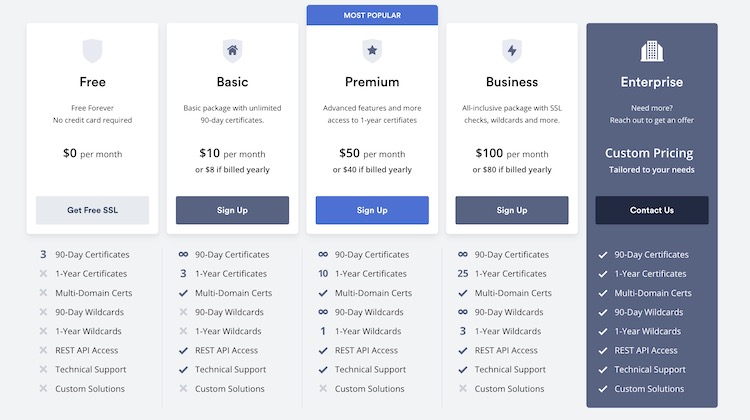
For this price, you are going to get unlimited 90-day SSL certificates and three 1-year SSL certificates. You will also unlock extra features, including REST API access, multi-domain certs, and more. If you want more, you can opt for its Premium and Business plans that cost $50/year and $100/year respectively. You can check the details in the image above. If your needs are not met by any of these plans, you can also get custom pricing quotes.
ZeroSSL: Get Free SSL Certificates in Minutes
ZeroSSL is an easy-to-use and powerful SSL certificate provider that allows you to quickly secure your domain and website. The company offers a comprehensive free plan, and the premium plans are also affordable. If you are still using out-dated HTTP websites, this is the time to upgrade it to an HTTPS website that your visitors and customers will trust.
Comments
Post a Comment