
Sphero Indi Is a Tiny Robotic Car That Helps Children Learn Programming

Google Camera 7.4 Update Brings 4K Video Resolution Toggle, 8x Zoom for Videos


Google Camera 7.4 Update Brings 4K Video Resolution Toggle, 8x Zoom for Videos

By Techtonic group

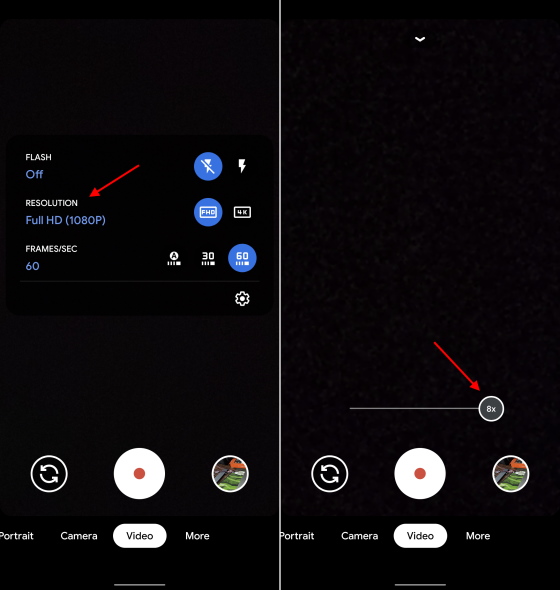
Google has rolled out a new update for its stock camera app on Pixel phones today. The Google Camera 7.4 update brings two video-centric features in tow. It adds the option to switch video resolution from the quick settings menu and allow up to 8x zoom while recording videos on the Pixel 4.

If you've used the Google Camera app, be it the official or modded version, you would know that switching the video resolution has always been a hassle. You need to leave the viewfinder and jump into the camera settings to access the same. Google Camera 7.4 is making it simpler to toggle the video resolution.

You can now swipe down on the video tab to access the new 'Resolution' option in the quick settings menu. It lets you choose between Full-HD (1080p) and 4K (Ultra-high resolution). The option to select the 'Frames/sec' only shows up for the 1080p video recording option as the Google Pixel supports 4K @ 30fps by default.
pixel 4 - google camera update

There's no 4K @ 60fps video recording support onboard. You can read why that's the case right here. Google is working to enable 4K @ 60fps video capture, as per recent reports, but the feature has not been bundled with this update.

Instead, Google Camera 7.4 makes the Pixel 4 capable of zooming in up to 8x while recording videos. The device includes a 2x telephoto lens and already lets you achieve zoom level up to 8x, thanks to its Super Res Zoom algorithm. The pictures turn out to be quite crisp and well, the videos should too.

Apart from the live features, the folks over at XDA discovered references to the Pixel 4a and Pixel 5 in the app's code. This means Google is prepping the Google Camera for its upcoming mid-range and flagship phones - possibly. The company is said to ditch the Snapdragon 865 for the 5G-enabled Snapdragon 765G mid-range chipset on Pixel 5.

Comments

Popular posts from this blog

Here is the First-Ever Video That Was Posted on YouTube

Here is the First-Ever Video That Was Posted on YouTube By Techtonic group Fifteen years ago, on Valentines' Day of 2005, the domain name "www.youtube.com" went live. The following months saw developments of the website and the first-ever video on the platform was posted on April 23, 2005. The YouTuber who shared the video was none other than one of the founding members, Jawed Karim. The YouTube that we know now is a massive video streaming platform with innumerable audience members. However,  it is fascinating to see from where the platform started its journey . So, in this article, I want to talk about the very first video that was uploaded on the platform, and surprisingly, it still exists. So, the 240p, grainy video, titled "Me at the zoo", shows a 25-year-old Jawed Karim, one of the founders of YouTube, standing in front of a group of elephants at the San Diego Zoo.  The 18-second video went live on April 23, 2005, and it is still there with ove...

How to Remotely Access Your Raspberry Pi from Windows, Mac, Linux, & Chrome OS

  How to Remotely Access Your Raspberry Pi from Windows, Mac, Linux, & Chrome OS We have already written a detailed guide on  how to use a Windows laptop as a monitor for Raspberry Pi , and it requires a wired ethernet connection. However, if you want to remotely access Raspberry Pi from your Windows 10, Mac, or Linux PC, you can do so with Wi-Fi and VNC server. In this article, we also explain the steps to connect to your Raspberry Pi remotely from a Chromebook in detail. Even if you are a beginner, you can follow the instructions and get it running in a few minutes. So without any delay, let’s go through the tutorial. Remotely Access Raspberry Pi From Windows, Mac, Linux & Chromebook (2021) Before establishing a remote connection, you will need to connect Raspberry Pi to your computer through the  wired ethernet medium for a quick one-time setup . This is essential to connect the Raspberry Pi to your Wi-Fi home network. As a result, an IP address will be assigne...

Instagram Parteners with Swiggy, Zomato to Let Resturant Add 'Food Order' Stickers in Stories

Instagram Parteners with Swiggy, Zomato to Let Resturant Add 'Food Order' Stickers in Stories By Techtonic group Instagram recently gave users the option to promote small (and local) businesses by placing a sticker in their Stories. Now, the company has partnered with two of India's renowned food delivery apps -  Swiggy and Zomato  - to bring a similar feature to the restaurant owners. It has debuted a new  'Food Order' sticker  that restaurants can include in their Stories to drive sales. The Coronavirus-led lockdown saw almost all restaurants and eateries shut shop for several days. And even when they opened, netizens have been wary to eat outside or order in due to hygiene concerns. Well, as restaurants open up in line with the WHO safety guidelines, they can now head to Instagram to find a new 'Food Orders' sticker in the Stories section. This new sticker is interactive and will  enable users to place food orders  simply by tapping on the sa...