
Sphero Indi Is a Tiny Robotic Car That Helps Children Learn Programming

Microsoft Blocking Windows 10 May 2020 Update on Some PCs Following Criteria Issues


Microsoft Blocking Windows 10 May 2020 Update on Some PCs Following Criteria Issues

By Techtonic group

Microsoft is blocking the Windows 10 May 2020 Update on a large number of devices after discovering a series of critical issues. The company has published a list of at least 10 known issues that it says it is investigating, while one of the bugs have already been mitigated. Some of the problems include unexpected BSODs or reboots, inability to connect to more than one Bluetooth device, intermittent mouse input with certain apps and games, and more.

Some Windows 10 users who are unable to update to the latest version, are reporting that Windows Update is notifying them if the new software is unavailable for their device. According to Redditor, u/ThrowYourDreamsAway, the update notification on their PC reads"The Windows 10 May 2020 Update is on its way. We're offering this update to compatible devices, but your device isn't quite ready for it. Once your device is ready, you'll see the update available on this page. There's nothing you need to do at this time".
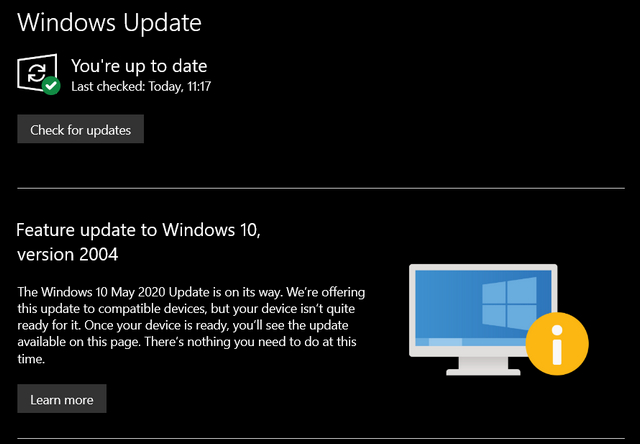
Screenshot Courtesy: u/ThrowYourDreamsAway (Via Reddit)

According to Bleeping Computer, incompatible drivers may be holding back the updates in some cases, and updating the drivers or uninstalling incompatible drivers might enable the update to go through. Better still, you can check out our detailed guide on how to force install the May 2020 Update on your PC. Do note that doing so might create compatibility issues with your device in some cases.

Released last week, the Windows 10 May 2020 Update brings a plethora of improvements and new features, including a new, chat-based UI for Cortana, updates to Virtual Desktops, a simplified Swift Pair for Bluetooth accessories, some design changes for the Settings app, Windows Hello biometric authentication for compatible PCs and more.

Comments

Popular posts from this blog

Instagram Parteners with Swiggy, Zomato to Let Resturant Add 'Food Order' Stickers in Stories

Instagram Parteners with Swiggy, Zomato to Let Resturant Add 'Food Order' Stickers in Stories By Techtonic group Instagram recently gave users the option to promote small (and local) businesses by placing a sticker in their Stories. Now, the company has partnered with two of India's renowned food delivery apps -  Swiggy and Zomato  - to bring a similar feature to the restaurant owners. It has debuted a new  'Food Order' sticker  that restaurants can include in their Stories to drive sales. The Coronavirus-led lockdown saw almost all restaurants and eateries shut shop for several days. And even when they opened, netizens have been wary to eat outside or order in due to hygiene concerns. Well, as restaurants open up in line with the WHO safety guidelines, they can now head to Instagram to find a new 'Food Orders' sticker in the Stories section. This new sticker is interactive and will  enable users to place food orders  simply by tapping on the sa...

Sphero Indi Is a Tiny Robotic Car That Helps Children Learn Programming

Robotic toys for learning are becoming more common in the market as kids turn more towards STEM learning. As a result, we’ve seen several modular and advanced robotic toys that are designed to help children learn the basic concepts of programming and problem-solving. And the Sphero indi is not that different. The Sphero indi Developed by renowned robotic-toy maker Sphero, the indi is essentially a toy car that helps children learn about the core concepts of problem-solving and logical thinking. The learning set comes with the indi, which the tiny robotic car, and a bunch of color-coded silicone-based tiles, designed to give the indi specific instructions. For instance, a green tile tells the car to move faster, a pink tile tells it to turn left, a yellow one instructs the car to drive slowly, and a red tile stops the car. So, the car comes equipped with a color sensor to detect the color of a tile over which it is driving and respond accordingly. Hence, using the Sph...

How to Remotely Access Your Raspberry Pi from Windows, Mac, Linux, & Chrome OS

  How to Remotely Access Your Raspberry Pi from Windows, Mac, Linux, & Chrome OS We have already written a detailed guide on  how to use a Windows laptop as a monitor for Raspberry Pi , and it requires a wired ethernet connection. However, if you want to remotely access Raspberry Pi from your Windows 10, Mac, or Linux PC, you can do so with Wi-Fi and VNC server. In this article, we also explain the steps to connect to your Raspberry Pi remotely from a Chromebook in detail. Even if you are a beginner, you can follow the instructions and get it running in a few minutes. So without any delay, let’s go through the tutorial. Remotely Access Raspberry Pi From Windows, Mac, Linux & Chromebook (2021) Before establishing a remote connection, you will need to connect Raspberry Pi to your computer through the  wired ethernet medium for a quick one-time setup . This is essential to connect the Raspberry Pi to your Wi-Fi home network. As a result, an IP address will be assigne...