
Sphero Indi Is a Tiny Robotic Car That Helps Children Learn Programming

GameSir X2 Turns Your Smartphone into a Nintendo Switch-like Console
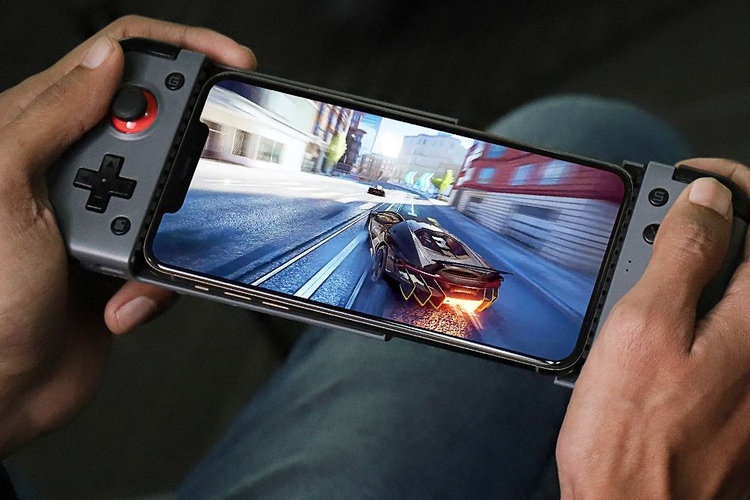
 

GameSir X2 Turns Your Smartphone into a Nintendo Switch-like Console


While there’s no dearth of game controllers that you can pair with your smartphone, finding a good one that doesn’t cost a fortune can prove to be a hassle. To bridge this gap, Chinese game accessory maker GameSir has launched a new mobile game controller and a tablet game controller.

GameSir X2 Mobile Game Controller


GameSir X2 controller supports both Android phones and iPhones and turns your phone into a Nintendo Switch-like console. It connects to devices via Bluetooth. You can even use the controller to play games on popular cloud gaming platforms like Xbox Cloud Gaming, Google Stadia, Nvidia GeForce Now, and Vortex.

With this controller, you get ABXY buttons on the right and joysticks on both sides. You can use this controller with smartphones measuring up to 173mm in length. It uses a 500 mAh battery that lasts up to 20 hours on a single charge. Charging the controller through the USB-C port takes up to 2 hours.

If you plan to buy this controller, we suggest you check out some of the best Nintendo DS emulators for Android and iOS to play nostalgic games such as Mario Kart, Pokemon, and many others only our smartphone.

GameSir F7 Claw Tablet Game Controller
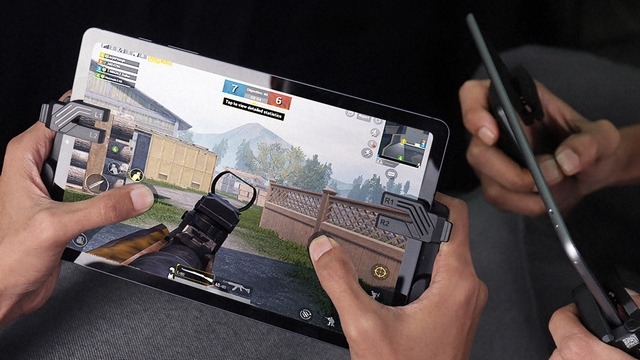
GameSir F7 Claw Tablet Game Controller
Image: GameSir

As the name suggests, the GameSir F7 controller is made for tablets such as iPads and other Android tablets. The company calls it the first capacitive gamepad for tablets, and could be a godsend for PUBG Mobile and Call of Duty Mobile gamers. It is designed with on-screen control games in mind. This one can be used with devices of thickness ranging from 6mm to 12mm.

The controller follows a suction cup design and has L1/ L2, R1/ R2, and two Turbo buttons. These Turbo buttons control the burst frequency of the L1 and R1 buttons, plus you get three different turbo modes to control the speed of the turbo buttons. The controller also offers 120 hours of usage time and charges within 2 hours through a USB-C port.

Pricing and Availability

The GameSir X2 controller is available to buy at $59.99 from Amazon. On the other hand, the GameSir F7 Claw controller will go on sale from May 24th for $39.99 via Amazon.

-by techtonic group


Comments

Popular posts from this blog

Instagram Parteners with Swiggy, Zomato to Let Resturant Add 'Food Order' Stickers in Stories

Instagram Parteners with Swiggy, Zomato to Let Resturant Add 'Food Order' Stickers in Stories By Techtonic group Instagram recently gave users the option to promote small (and local) businesses by placing a sticker in their Stories. Now, the company has partnered with two of India's renowned food delivery apps -  Swiggy and Zomato  - to bring a similar feature to the restaurant owners. It has debuted a new  'Food Order' sticker  that restaurants can include in their Stories to drive sales. The Coronavirus-led lockdown saw almost all restaurants and eateries shut shop for several days. And even when they opened, netizens have been wary to eat outside or order in due to hygiene concerns. Well, as restaurants open up in line with the WHO safety guidelines, they can now head to Instagram to find a new 'Food Orders' sticker in the Stories section. This new sticker is interactive and will  enable users to place food orders  simply by tapping on the sa...

Sphero Indi Is a Tiny Robotic Car That Helps Children Learn Programming

Robotic toys for learning are becoming more common in the market as kids turn more towards STEM learning. As a result, we’ve seen several modular and advanced robotic toys that are designed to help children learn the basic concepts of programming and problem-solving. And the Sphero indi is not that different. The Sphero indi Developed by renowned robotic-toy maker Sphero, the indi is essentially a toy car that helps children learn about the core concepts of problem-solving and logical thinking. The learning set comes with the indi, which the tiny robotic car, and a bunch of color-coded silicone-based tiles, designed to give the indi specific instructions. For instance, a green tile tells the car to move faster, a pink tile tells it to turn left, a yellow one instructs the car to drive slowly, and a red tile stops the car. So, the car comes equipped with a color sensor to detect the color of a tile over which it is driving and respond accordingly. Hence, using the Sph...

How to Remotely Access Your Raspberry Pi from Windows, Mac, Linux, & Chrome OS

  How to Remotely Access Your Raspberry Pi from Windows, Mac, Linux, & Chrome OS We have already written a detailed guide on  how to use a Windows laptop as a monitor for Raspberry Pi , and it requires a wired ethernet connection. However, if you want to remotely access Raspberry Pi from your Windows 10, Mac, or Linux PC, you can do so with Wi-Fi and VNC server. In this article, we also explain the steps to connect to your Raspberry Pi remotely from a Chromebook in detail. Even if you are a beginner, you can follow the instructions and get it running in a few minutes. So without any delay, let’s go through the tutorial. Remotely Access Raspberry Pi From Windows, Mac, Linux & Chromebook (2021) Before establishing a remote connection, you will need to connect Raspberry Pi to your computer through the  wired ethernet medium for a quick one-time setup . This is essential to connect the Raspberry Pi to your Wi-Fi home network. As a result, an IP address will be assigne...